Tagged: x
-
AuthorPosts
-
April 20, 2016 at 10:53 pm #892942
 WPH2oParticipant
Hello,
The site has many categories.
I want to hide the:
1. Post Carousel (slider above the menu), and
2. Featured Image…on posts in three of the categories.
I’ve tried each of the following with NO success (for the Post Carousel):
/* FAIL - hide top post carousel (above menu) on categories: apples, bananas, oranges */
.category-apples .x-post-carousel,
.category-bananas .x-post-carousel,
.category-oranges .x-post-carousel {
    display: none  !important;
}

/* FAIL - hide top post carousel (above menu) on categories: apples, bananas, oranges */
.category-apples .x-post-carousel.unstyled,
.category-bananas .x-post-carousel.unstyled,
.category-oranges .x-post-carousel.unstyled {
    display: none  !important;
}

/* FAIL - hide top post carousel (above menu) on categories: apples, bananas, oranges */
.category-apples ul.x-post-carousel.unstyled.slick-initialized.slick-slider,
.category-bananas ul.x-post-carousel.unstyled.slick-initialized.slick-slider,
.category-oranges ul.x-post-carousel.unstyled.slick-initialized.slick-slider {
    display: none  !important;
}
Please help me hide the Featured Image and Post Carousel based on the category name.
Thank you,
Chris
April 21, 2016 at 6:28 am #893458 Paul RModerator
Hi Chris,
Please use category id instead.
https://community.theme.co/kb/how-to-locate-category-ids/
eg.
.category-1 .x-post-carousel,
.category-2 .x-post-carousel,
.category-3 .x-post-carousel {
    display: none  !important;
}
Hope that helps
April 21, 2016 at 10:48 pm #894717WPH2oParticipantHello,
Thank you for the help.
Using the Category IDs did NOT work.
I’ll share the code and links in a private reply.
Chris
April 21, 2016 at 10:52 pm #894726WPH2oParticipantThis reply has been marked as private.April 22, 2016 at 9:07 am #895407WPH2oParticipantThis reply has been marked as private.April 22, 2016 at 3:19 pm #895868JadeModeratorHi Chris,
Please try this:
.postid-146420 .x-post-carousel,
.postid-146424 .x-post-carousel,
.postid-146425 .x-post-carousel {
    display: none  !important;
}
Hope this helps.
July 8, 2016 at 9:38 pm #1078821WPH2oParticipantHello,
None of these work when I add the CSS to the Custom CSS file we use for all other CSS.
We use the WordPress JetPack plugin and its Custom CSS page.
The only time any of these work is when we add them to the Cornerstone Customizer, Custom, Edit Global CSS settings.
This is unfortunate, that all of our CSS is nicely organized in one place, except that Cornerstone CSS must be in a separate place. So now we have Custom CSS in tow locations.
How can we tell Cornerstone to use the CSS that all other elements and plugins use on the site?
How can we tell Cornerstone to use Jetpack’s Custom CSS?Jetpack is made by the WordPress people, and literally ALL other plugins and any elements we use in sites–they all work with Jetpack’s Custom CSS. Why won’t Cornerstone comply with these WordPress standards?
Thank you,
Chris
July 9, 2016 at 3:17 am #1079048Rue NelModeratorHello Chris,
To cut to the chase, the very easy solution for you to have is by using your original css solution as stated:
.category-apples .x-post-carousel,
.category-bananas .x-post-carousel,
.category-oranges .x-post-carousel {
    display: none  !important;
}
But before we can do that, we should be able to add those categories into the body classes first. To do that, please insert this following code in your child theme’s functions.php file.
add_filter('body_class','add_category_to_single');
function add_category_to_single($classes, $class) {
  if (is_single() ) {
    global $post;
    foreach((get_the_category($post->ID)) as $category) {
      // add category slug to the $classes array
      $classes[] = $category->category_nicename;
    }
  }
  // return the $classes array
  return $classes;
}
for your reference: https://css-tricks.com/snippets/wordpress/add-category-name-body_class/
Once you have completed that, you can reference any single post by just using the category name in your css. Having to do this will prevent you from getting the post ID of the single blog post. And you can do the same for the feature image.
And please keep in mind that in most cases WP Engine tries to cache its resources. This can cause stale data to be loaded. To resolve this, you’ll need to clear the site cache in WPEngine right after saving every changes you made in Cornerstone.
How to purge the site cache
You can use our interactive tutorial, “What should I do if I make changes and they don’t take effect?“, in the User Portal, or you can follow the instructions below.
Purging your site cache is very easy. You just need to know where the button is located:- Long into /wp-admin/
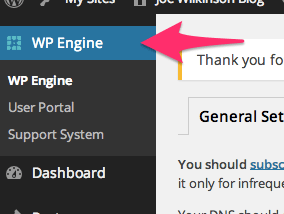
- Click on WP Engine button located at the left top side.
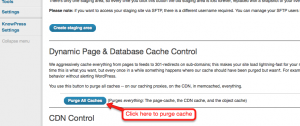
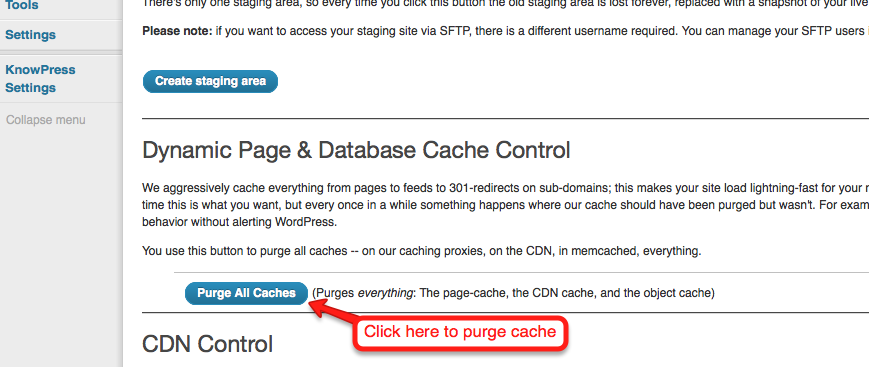
- Click “Purge all caches.”
Finally, clear your browser cache and refresh your page. Once you refresh the page you should notice that the content has updated. If it is still not updating, you may want to consider contacting support by creating a support ticket.To know more about WPEngine caching system, please check it out here: https://wpengine.com/support/cache/
-
AuthorPosts
- <script> jQuery(function($){ $("#no-reply-892942 .bbp-template-notice, .bbp-no-topic .bbp-template-notice").removeClass('bbp-template-notice'); }); </script>
