-
AuthorPosts
-
July 12, 2015 at 1:25 am #327625
 adrianlischerParticipant
When i’m editing in cornerstone the font is pretty, thin and exactly how I want it, but when I go view the live page the font is bold and not what I want. How can I fix this?
See images for clarity:


 July 12, 2015 at 2:14 am #327647
 Rue NelModerator
Hello There,
Thanks for writing in! To assist you with this issue, we’ll first need you to provide us with your URL. This is to ensure that we can provide you with a tailored answer to your situation. Once you have provided us with your URL, we will be happy to assist you with everything.
Thank you.
July 12, 2015 at 8:10 am #327777adrianlischerParticipantMy URL: http://www.SoGood.social
thank you very much!
July 12, 2015 at 9:27 am #327819RupokMemberHello There,
Thanks for updating. Upon checking your website, it seems you didn’t set any font for those and it’s showing the Lato font that set on body. As we are not sure about what you are seeing on the Cornerstone, we need to check the backend too.
Would you mind providing us with login credentials so we can take a closer look? To do this, you can make a post with the following info:– Link to your site
– WordPress Admin username / password
– FTP credentialsDon’t forget to select Set as private reply. This ensures your information is only visible to our staff.
July 12, 2015 at 10:26 am #327836adrianlischerParticipantThis reply has been marked as private.July 12, 2015 at 11:27 am #327848RupokMemberHi There,
Thanks for updating! Upon checking your website it seems the fonts are same on backend and frontend. However you didn’t select any custom font for your site so it’s using the default font (Lato). If you want to set you custom font, then turn on Custom Fonts from Customize > Typography and select the font-family from below. Check the image –

Hope this helps.
Cheers!
July 12, 2015 at 1:13 pm #327902adrianlischerParticipantThanks for the reply!
Basically, I want the font that CornerStone uses to be the same one that is on the live site?
See the images in first post, lighter font instead of bolder font.
I checked on the custom font in your screen shot but it didn’t update this.. If i need to change the font, want font does cornerstone use?
July 12, 2015 at 1:24 pm #327911adrianlischerParticipantwhen i pick Lato as my font but try to change it to ultra light or any other weight, nothing seems to change on my site?
I just found out it DOES update in cornerstone, but NOT on the live site when published.
July 12, 2015 at 2:18 pm #327937RupokMemberHi There,
Thanks for writing in! You can also set your own font-weight for the pricing table contents by adding some custom CSS through Appearance> Customize > Custom > CSS
.x-pricing-column-info ul > li {
  font-weight: lighter;
}
Hope this helps.
Cheers!
July 12, 2015 at 3:01 pm #327961adrianlischerParticipantokay thanks! How about the paragraph? Making the output online look the same as the cornerstone editor?
or code like the one above for paragraph text?
you can noticed the biggest problem, when looking at the subtitle until ‘No bulls#*t pricing’ on corner stone and then on the live site. the live site is much bolder. The font weight selector in typography doesn’t seem to be changing anything
for example, in cornerstone the contact form as bold and unbolded font (ex. Address (unbold) – physical address (bold)… yet on the live it it just all shows up bold…
July 12, 2015 at 6:05 pm #328057RadModeratorHi there,
Before we go deeper, I’d like to know what is “varnish”, I can’t even find it from your plugin list. But it sounds like a caching, and I assume it’s your hosting’s custom feature for wordpress? We must disable it first since caching could affect how front renders. You can see “Purge Varnish” on your admin bar.
And it looks like your site’s html markup isn’t that good. They look messy on my end and I can’t tell if it’s caused by your custom coding or a plugin.
This screenshot is just one of them, lower scripts are wrapped by
<b>and malformed<a>. It shouldn’t be that way. Any malformed html could affect rendering specially that cornerstone is relying on DOM.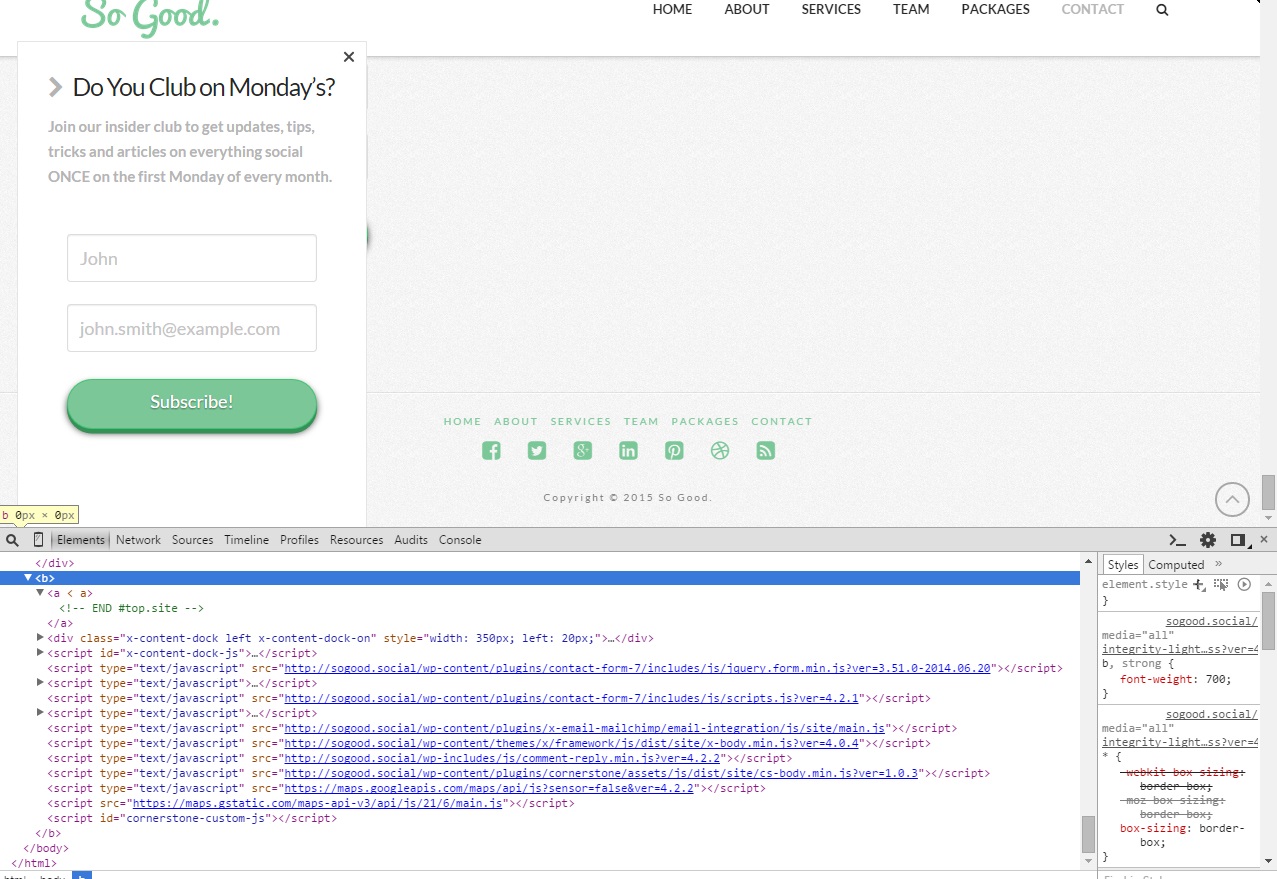
These should be fixed first before we continue 🙂
Thanks!
February 25, 2016 at 7:23 am #811956 henrywhiteParticipant
Hi I am having the same issue as above – and can’t seem to find a resolve. Basically – same repeated text element on the page, but half way down (on the yellow background) the para of text goes from 300 weight (book) to a 700 (bold) for no apparant reason. The thing is, like Adrian above – I can see that in Cornerstone it is the lighter weight but as soon as I go to the Live page it puts in a false bolding on these paragraphs and also on the jumbo button at the bottom of the page. Here is the link:
February 25, 2016 at 10:22 am #812142RupokMemberHi @henrywhite
Kindly go through the previous reply as it’s already answered. You can share your login credentials in a private reply if you still can’t figure it out.
Cheers!
-
AuthorPosts
- <script> jQuery(function($){ $("#no-reply-327625 .bbp-template-notice, .bbp-no-topic .bbp-template-notice").removeClass('bbp-template-notice'); }); </script>
