Tagged: x
-
AuthorPosts
-
August 24, 2016 at 11:58 am #1144972
 dianesanfilippoParticipant
I’m building a new page using Cornerstone’s page editor, and I’d like to place background images on different sections. The background image appears, no problem, within the page editor, but it doesn’t show up on the page. When I inspect the page, I don’t see the background image coming in anywhere.
I’ve tried using both a page that already has background images in place and recreating a new page.
Per recommendations I’ve found in the forums, I’ve tried:
-different page templates
-adding
.site {
background-color : transparent;
}I’m not the web developer who put this site together, rather the graphic designer who builds pages and maintains the site post-build. I believe we’re using the “X” theme, version 4.6.1.
August 24, 2016 at 12:00 pm #1144973dianesanfilippoParticipantThis reply has been marked as private.August 24, 2016 at 2:41 pm #1145285 Nabeel AModerator
Hi there,
Thanks for writing in! I’ve checked your homepage and sections are displaying background images correctly. Can you please share the screenshots so we can take a look?
Thanks!
August 24, 2016 at 3:33 pm #1145348dianesanfilippoParticipantSure!
1. balancedbites.com/practicalpaleospiceblends in Cornerstone (this page was cloned from the Mediterranean Paleo Cooking page, which is displaying images no problem)
2. balancedbites.com/practicalpaleospiceblends
3. balancedbites.com/practical-paleo-spices in Cornerstone (this page was created entirely from scratch)
4. balancedbites.com/practical-paleo-spicesFor what it’s worth, I’m using Chrome. I’m also checking the pages (not in Cornerstone) in an incognito window in the event it might be a local caching issue.
The issue isn’t with pages that have already been created, it seems to be an issue with creating new pages.
Two of the images didn’t attach. the ones attached are numbers 2 and 4.
1 and three will be in the next reply.
August 24, 2016 at 3:41 pm #1145371dianesanfilippoParticipantHere are images 1 and 3, in order, from the above list.
August 24, 2016 at 10:10 pm #1145943Rue NelModeratorHello There,
Thanks for the updates! Cornerstone and WPEngine doesn’t really go along much. The Cornerstone builder takes place on the front end, in most cases WP Engine tries to cache its resources. This can cause stale data to be loaded. To resolve this, you’ll need to clear the site cache in WPEngine right after saving every changes you made in Cornerstone.
How to purge the site cache
You can use our interactive tutorial, “What should I do if I make changes and they don’t take effect?“, in the User Portal, or you can follow the instructions below.
Purging your site cache is very easy. You just need to know where the button is located:- Long into /wp-admin/
- Click on WP Engine button located at the left top side.
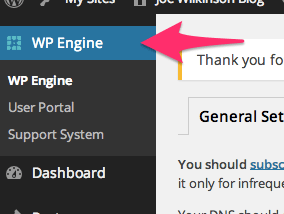
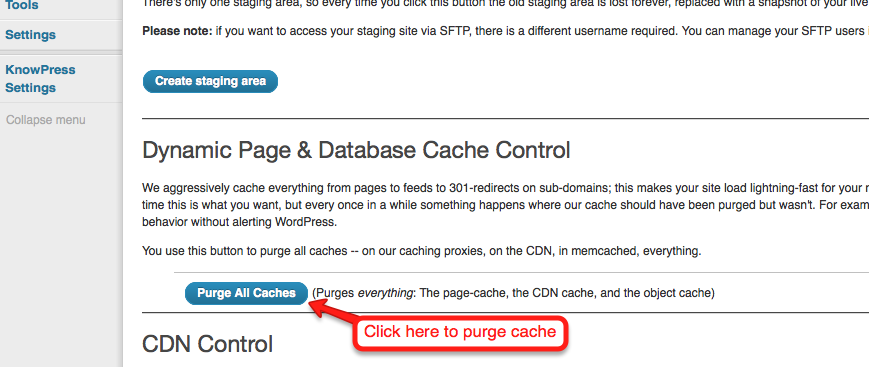
- Click “Purge all caches.”
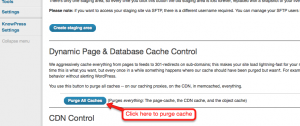
Finally, clear your browser cache and refresh your page. Once you refresh the page you should notice that the content has updated. If it is still not updating, you may want to consider contacting support by creating a support ticket.To know more about WPEngine caching system, please check it out here: https://wpengine.com/support/cache/
Please let us know how it goes.
August 26, 2016 at 1:08 pm #1148605dianesanfilippoParticipantWPEngine doesn’t seem to be the issue, image size does. It seems as though background images are no longer allowed to exceed 100KB. Would this be something that would be controlled through the theme or WPEngine? It just seems weird that image size hasn’t been an issue until I’ve built this page.
August 26, 2016 at 3:09 pm #1148728JoaoModeratorHi Diane,
It seems as though background images are no longer allowed to exceed 100KB. Would this be something that would be controlled through the theme or WPEngine?
I really find this strange and I can issue that this observation is not related to the theme.
Please contact WPEngine regarding this,
Let us know what they tell you,
Thanks
Joao
-
AuthorPosts
- <script> jQuery(function($){ $("#no-reply-1144972 .bbp-template-notice, .bbp-no-topic .bbp-template-notice").removeClass('bbp-template-notice'); }); </script>
