Tagged: x
-
AuthorPosts
-
September 15, 2016 at 1:46 am #1176144
 twangParticipant
Hi, I’ve been struggling with this problem for some time. The filters for activity (updates, new groups, friendships, etc.) do not do anything when selected. See http://www.ucimaeprojects.com/activity/
I’ve tried turning off all of the plugins.
Thanks,
September 15, 2016 at 3:41 am #1176260 NicoModerator
Hi There,
Thanks for writing in.
Would you mind providing us with login credentials so we can take a closer look? To do this, you can make a post with the following info:
– Link to your site
– WordPress Admin username / password
– FTP credentialsDon’t forget to select Set as private reply. This ensures your information is only visible to our staff.
Thanks.
September 15, 2016 at 11:56 am #1176886twangParticipantThis reply has been marked as private.September 15, 2016 at 7:49 pm #1177483Rue NelModeratorHello There,
Thanks for the information. I have logged and noticed that there are several plugins which are out of date. Most of the time out dated plugin create issues in your site. Please do update to the latest version first. And then after the updates since you are using WPEngine, in most cases WP Engine tries to cache its resources. This can cause stale data to be loaded. To resolve this, you’ll need to clear the site cache in WPEngine right after saving every changes or updates you made.
How to purge the site cache
You can use our interactive tutorial, “What should I do if I make changes and they don’t take effect?“, in the User Portal, or you can follow the instructions below.
Purging your site cache is very easy. You just need to know where the button is located:- Long into /wp-admin/
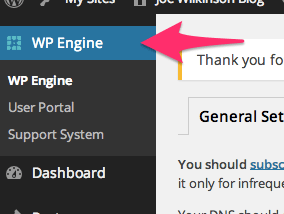
- Click on WP Engine button located at the left top side.
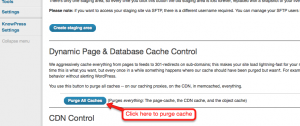
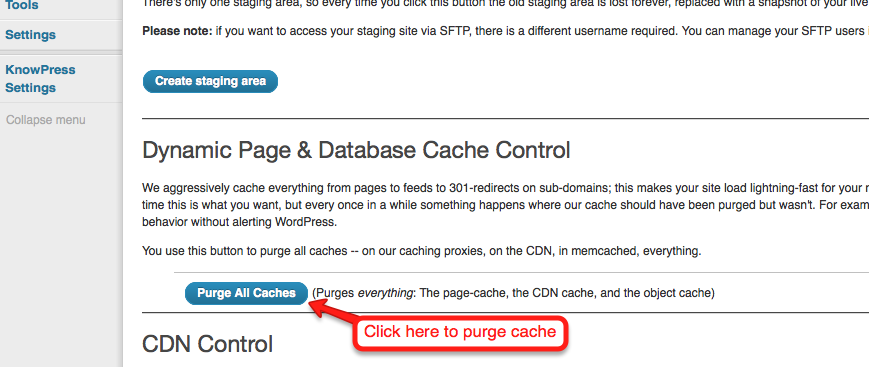
- Click “Purge all caches.”
Finally, clear your browser cache and refresh your page. Once you refresh the page you should notice that the content has updated. If it is still not updating, you may want to consider contacting support by creating a support ticket.To know more about WPEngine caching system, please check it out here: https://wpengine.com/support/cache/
Please let us know how it goes.
September 19, 2016 at 11:24 pm #1182593twangParticipantHi, I’ve followed your instructions. Unfortunately the filter still does not work. Do you have an alternate solution or work around.
Many thanks in advance for your help.
September 20, 2016 at 5:36 am #1182944ChristianModeratorHey there,
To know if this is an issue with X, would you mind switching to the default WordPress theme and check if the issue persists?
Thanks.
September 20, 2016 at 4:34 pm #1183746twangParticipantHi, I switched it to the Twenty sixteen theme and the filters works just fine.
September 21, 2016 at 4:24 am #1184352ChristianModeratorI see you have custom bbPress and Buddypress functions in your functions.php. Would you mind removing them then test again?
Thanks.
September 25, 2016 at 11:29 pm #1190339twangParticipantHi I removed the bbpress and buddypress functions in functions.php in x-child-integrity-light. It still does not work. In fact, the additions in functions.php were provided by X-theme support from https://community.theme.co/forums/topic/how-to-add-a-logout-command-to-buddypress-menu-in-x/
Please let me know what the next step is.
Thanks.
September 26, 2016 at 2:00 am #1190414RadModeratorHi there,
Please restore the code. The reason why it’s not working is because x-buddypress.js isn’t loaded.
   if ( X_BUDDYPRESS_IS_ACTIVE ) {
      wp_dequeue_script( 'bp-legacy-js' );
      wp_dequeue_script( 'bp-parent-js' );
      wp_enqueue_script( 'x-site-buddypress', X_TEMPLATE_URL . '/framework/js/dist/site/x-buddypress.js', bp_core_get_js_dependencies(), X_VERSION, false );
      wp_localize_script( 'x-site-buddypress', 'BP_DTheme', x_buddypress_core_get_js_strings() );
    }
I like to check if X_BUDDYPRESS_IS_ACTIVE is returning false or if it’s just due to the cache, but I can’t login through your FTP. It says,
Error:	Authentication failed.
Error:	Critical error: Could not connect to server
Please check and let me know.
Thanks!
October 4, 2016 at 1:05 am #1201538twangParticipantThis reply has been marked as private.October 5, 2016 at 2:00 pm #1203874RadModeratorHi there,
I mean the code you just removed, please restore it back.
I logged and added changes to functions.php but it doesn’t reflect on WP admin’s functions.php. FTP might be pointing on the wrong folder, or there is a cache. Instead, I just edited functions.php in admin.
add_action('init', 'requeue_buddypress', 99);

function requeue_buddypress () {

if ( X_BUDDYPRESS_IS_ACTIVE ) {
      wp_dequeue_script( 'bp-legacy-js' );
      wp_dequeue_script( 'bp-parent-js' );
      wp_enqueue_script( 'x-site-buddypress', X_TEMPLATE_URL . '/framework/js/dist/site/x-buddypress.js', bp_core_get_js_dependencies(), X_VERSION, false );
      wp_localize_script( 'x-site-buddypress', 'BP_DTheme', x_buddypress_core_get_js_strings() );
    }

}
And it doesn’t work, I even tried
echo 'hello world';for testing and it doesn’t work. There might be some cache issue, though WPEngine doesn’t allow it on a staging site. All the changes I added won’t take effect on the front. Would you mind try cloning on your on other host or on your local to see if it has the same problem?Thanks!
October 5, 2016 at 2:40 pm #1203933twangParticipantHi Rad,
Are you sure you did it to the staging site? The changes you’ve made recently cause the site to show string(10)”hello test” in the production site when a user logs in. Can I trouble you to remove it. I apologize as I’m not too familiar with the programming aspect.
Thanks,
October 5, 2016 at 7:17 pm #1204202RadModeratorHi there,
I did it on the files located from your FTP (with the provided login credentials). I can’t tell if it’s for production or staging. That explains why my changes won’t take effect. I removed it (clear your cache too).
Then please provide the FTP login credentials for the staging.
Thanks!
October 6, 2016 at 1:05 am #1204675twangParticipantThis reply has been marked as private. -
AuthorPosts
- <script> jQuery(function($){ $("#no-reply-1176144 .bbp-template-notice, .bbp-no-topic .bbp-template-notice").removeClass('bbp-template-notice'); }); </script>
