-
AuthorPosts
-
March 21, 2014 at 2:52 pm #25324
 Steve LParticipant
Any updates on allowing us to use sound on background videos? A lot of clients do want sound when the video is being used as an introduction to their business. We can add it to the slider but it doesn’t render on the full screen as nicely.
March 22, 2014 at 1:25 am #25505 KoryKeymaster
Hey Steve,
Thanks for writing in! If you want to add sound yourself at this time, you can do so by implementing a child theme to make some changes to a few templates (instructions on how to do this in the Knowledge Base). Once you have done that, copy over both the /x/framework/views/global/_slider-revolution-above.php and /x/framework/views/global/_slider-revolution-below.php files to your child theme with the same directory paths to the files (further instruction on this in the Knowledge Base as well under Customization Best Practices). Once you have copied it over successfully, simply change this line of code:
BV.show('<?php echo $bg_video; ?>', { ambient : true });To this:
BV.show('<?php echo $bg_video; ?>', { ambient : false });Thanks!
March 24, 2014 at 5:00 pm #26132Steve LParticipantThank you brother. This worked great, but now I have to overcome the issue of the pause/play control. Obviously the video is a background, so is there a way to add video control with a Revolution layer or something? If we could do that we would have a perfect solution to what we’re trying to achieve!!
March 25, 2014 at 11:13 pm #26545KoryKeymasterHey Steve,
Thanks for writing in! Regretfully this is not possible. The intention of the background feature that we have implemented is aesthetic in nature and is not intended to function like video content. If you want to do what you’re mentioning, you’ll need to look into adding a video layer into your slider, which is a Slider Revolution feature (you can read more about this in their online documentation if you’d like).
Thanks!
March 30, 2014 at 9:17 am #27886Steve LParticipantThanks. But X uses the BigVideo.js which has a pause/play function for the background video. See http://dfcb.github.io/BigVideo.js/ – so I guess the question is, how can we enable this ability to pause the background video? And even better – how do we do it with an aesthetic element (like a image play button)?
See why we need this at the project I’m building. I think you’ll see that the issue becomes very evident – Check out my site at http://www.flickslocal.com
March 31, 2014 at 12:50 pm #28206AlexanderKeymasterHi Steve,
X Theme uses BigVideo, but doesn’t make use of these APIs specifically. So while technically it could be possible based on the library being used, it’s still not something that is supported. This would take quite a bit of custom development, and is outside the scope of what we can help with in our support.
The best way to add video would be to use a Video layer within Revolution Slider. You can click “edit video” and choose to not hide the controls. This would allow the youtube or vimeo controls to show on the page so users can start and stop the video.
August 22, 2015 at 8:41 am #366061 M4xNamaraParticipant
Hey X-Theme Staff,
is this trick still working in the current version of X-theme? The files are now _slider-above.php and _slider-below.php, but i cant find any line with “ambient” in it.
Best regards
m4xAugust 22, 2015 at 6:12 pm #366293RadModeratorHi there,
It should be the same, and ambient is there.
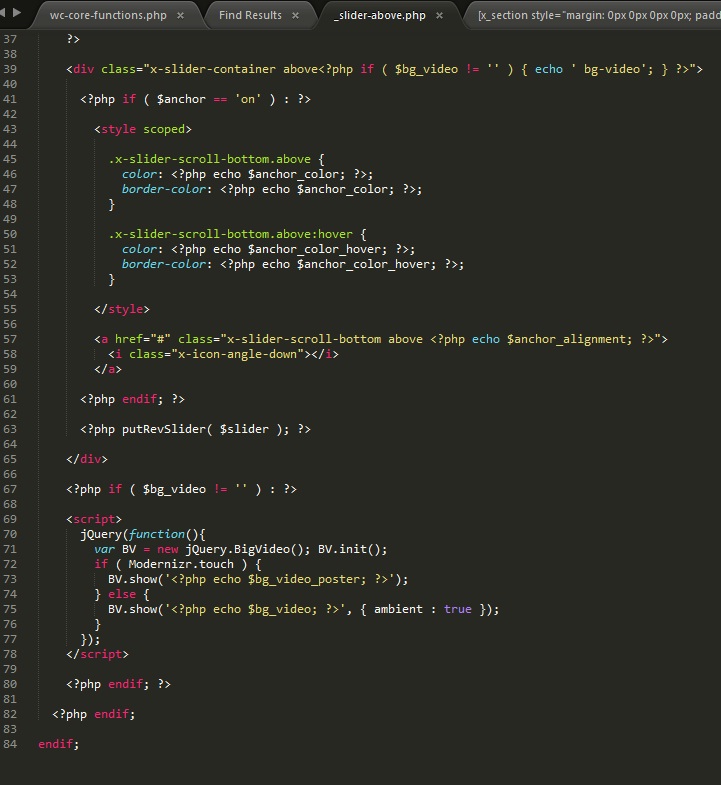
Thanks!
-
AuthorPosts
- <script> jQuery(function($){ $("#no-reply-25324 .bbp-template-notice, .bbp-no-topic .bbp-template-notice").removeClass('bbp-template-notice'); }); </script>
