Feature request fonts and sections settings

Hi Team,

i have a request for a future update. (Pro)

It would be great if we could , just as we can for fonts and colors, set other defaults

e.g. set a default font, size and line height for h1-h6, span, p etc

That will save a lot of time, also when you want to make a change for a size over all elements that use that setting

Also for the sections… now the default is 45px top and bottom but a ways to change that value would be great.

Tanks
Q
Hey Q,

Sounds like you’re looking for an Element Default feature. Cornerstone and Pro already has that as part of the Template Manager. Please check out the documentation here: https://theme.co/apex/forum/t/template-manager/20364

Hope that helps.

Hi @christian_y

No that was not what I meant.

That part is clear.

What I meant was to have something for settings like in theme options for example, you can set defaults that you want to use for most options.

it would be nice if we could do that for all kinds of elements, e.g. sections which now , by default, have top and bottom padding of 45px… it would be nice if you could change that default.

H1 for example in pro, by default is 1em, would be nice if you could set a default of another value

I’d like to take it even further… if then, there would also be the option to change the values based on certain breakpoints, it would be awesome. (of course it should be n option that can be enabled and disabled.

Cheers

Q

Hey Q,

Thank you for your feedback and I understand what you’re proposing. However, integrating element options into theme options or other areas would be massive and might add bloat to the theme especially that there’s already an Element Default feature already in place. We’d basically would develop another system for what you’re asking.

Per screen width option value is already in our feature request list. I’ll add your “other” element default idea to our list though so our development team would be made aware about that. Just note that we can’t promise that it will be implemented.

-----------------------------------------------------------------------------------

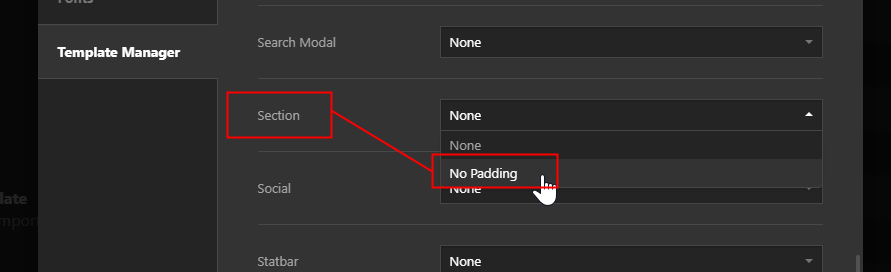
My previous instruction might not be clear so to clarify for those who don’t know yet, the way to achieve 0 padding as the Section element’s default, currently, is to use the Element Default feature. The Element Default feature is part of the Template Manager. When you’re building a page, simply configure a Section according to what you want the default values should be and save the section as a template. You can then use that template as the Element Default.

Hope that helps.

1 Like

Wonderful, thanks for the explanation, learned something :slight_smile:

You’re welcome!
We’re glad @Christian were able to help you out.

This topic was automatically closed 10 days after the last reply. New replies are no longer allowed.