Using a condition on an element to display after a certain date/time

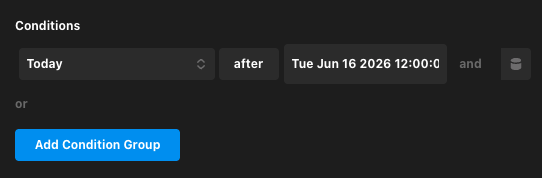
I am trying to use a Condition on an element to have it display after a specific time and day. I am not having any luck getting it to work. Should the Condition be “today” or “datetime”? I have tried both and used the datepicker to select a day/time in the future, but the item does not appear.

Screenshot 2026-06-16 at 2.21.47 PM

Hey @501creative,

To get your element to display after a specific day and time, here is what you need to know about the “Today” vs. “Datetime” conditions and how to test them:

1. Which condition to use?

  • Use “Today” (Recommended): This is a Global condition. It automatically compares the current WordPress site time against the date/time you select in the date picker.
  • Do not use “Datetime” (unless comparing custom data): This is an Expression condition. It is designed to compare two custom values using Dynamic Content. If you choose “Datetime”, you must manually input a Dynamic Content string (like {{dc:global:date}}) in the first field to act as the current time. If left blank or incorrect, the comparison will fail.

2. Why the item does not appear when choosing a future date

  • If you set the condition to display after a date/time in the future, the current time is still in the past relative to that target.
  • Therefore, the condition is not met yet, and the item correctly remains hidden. It will only appear once that future date/time is actually reached.

3. How to test if it’s working

  1. Select the Today condition.
  2. Set the operator to after.
  3. Use the datepicker to select a day/time in the past (e.g., yesterday or 10 minutes ago).
  4. Save and view the page. The element should appear immediately, proving the condition works.

[!NOTE]
The evaluation uses your WordPress site’s local time. Make sure your site’s timezone is correctly configured under Settings > General in the WordPress admin dashboard.

Thank you /for the response. Using “Today” did the trick, but I am having some unintended results. The current time on my site is Chicago (UTC -5). When I use the date picker the field is populated as “Wed Jun 17 2026 10:45:00 GMT-0500”. The element was not appearing unless I offset the time by 5 hours, so if I want it to appear at 12:00pm local, I need to set it to 7:00am. It seems like the condition uses the unmodified UTC time. If I strip off the UTC adjustment to make the time "“Wed Jun 17 2026 10:45:00”. It also seems to work correctly.

Is this how it is expected to work? Should I be doing something differently?
Hello @501creative,

You will have to remove the “GMT-0500” so that “Today” condition will be compared to the current local time.

Thanks.

This topic was automatically closed 10 days after the last reply. New replies are no longer allowed.