Hi,
I’m choosing a theme for another company I work with, and I would love to use XTHEME again… but i need to have a full height home. Is it possibile?
Thank you
Hi,
I’m choosing a theme for another company I work with, and I would love to use XTHEME again… but i need to have a full height home. Is it possibile?
Thank you
Hey Valentina,
I’m sorry but I’m not sure what you mean by “full height home”. Do you mean full height section? If so, you just need to add height: 100vh; to the Inline CSS field of the Section. It’s under the Customize tab.
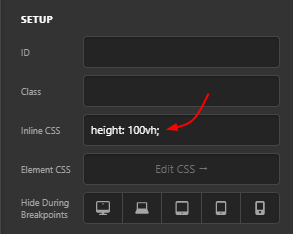
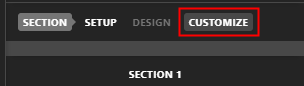
I just wanted to add though that you should watch your content’s height. It must not be taller than the screen’s height because this will create a double scrollbar issue. You must see to it that your content fits in the section in all screen sizes.
Thanks.
Hi Christian,
Thnk you for your help.
Actually, what I meant was “full height page” not section, because with the section option I’ve the header that makes me scroll the page to see it.
You can check here:https://www2.kelyan.it/servizi/industria-4-0/
Is there a way to set the full height to the whole page?
Hi Valentina,
Try using this css.
.page-id-2026 #top {
    display: flex;
    flex-direction: column;
    min-height: 100vh;
}

.page-id-2026 .x-main.full {
    flex: 1;
}

.page-id-2026 .entry-content.content,
.page-id-2026 article,
.page-id-2026 .x-section,
.page-id-2026 div#cs-content {
    height: 100% !important;
}
You also need to change the page id to match the page id of the page you want to have a full height. Also this only is working with pages that only has one section.
Hope it helps.
This topic was automatically closed 10 days after the last reply. New replies are no longer allowed.