I would like content to be edited with the CS, how do I setup that though?
Hey @abdurrehman,
To edit the page in Cornerstone, you click the Edit with Cornerstone link. Please remember to copy the contents before that because it will be removed when you edit the page in Cornerstone.
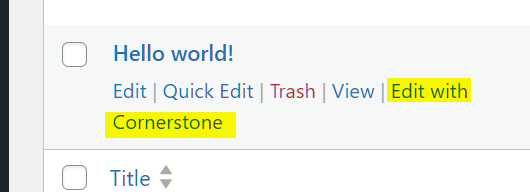
Well, what you’re saying that’s a post and I’m talking about the Projects and doing that so just mess it up and doesn’t edit that. See screenshot.
I couldn’t edit the text added in the project as that doesn’t allow editing the single project template.
Hello @abdurrehman,
Your Single Portfolio Item is a custom single layout to display each of your portfolio items. This is the overall layout of your portfolio item pages. On this layout, you have the “The Content” element, which is the placeholder of the portfolio item content:

If you want to edit the contents of a specific “Projects” portfolio item, you will have to find that item and edit it with either the default WordPress editor or with the Cornerstone builder. The Contents that you will add will then be displayed inside the “The Content” element in the Single Portfolio Layout.
I understand your confusion because at the moment, you only have 1 portfolio item. I would highly recommend that you add at least two or more “Projects” portfolio items first, and then you will be familiar with the relationship between the individual portfolio items and the Single Portfolio Layout.
With the existing Projects portfolio item, you originally added the contents with the default WordPress Editor. You can edit it in Portfolio > Portfolio, select the item, and click the “Edit” link.
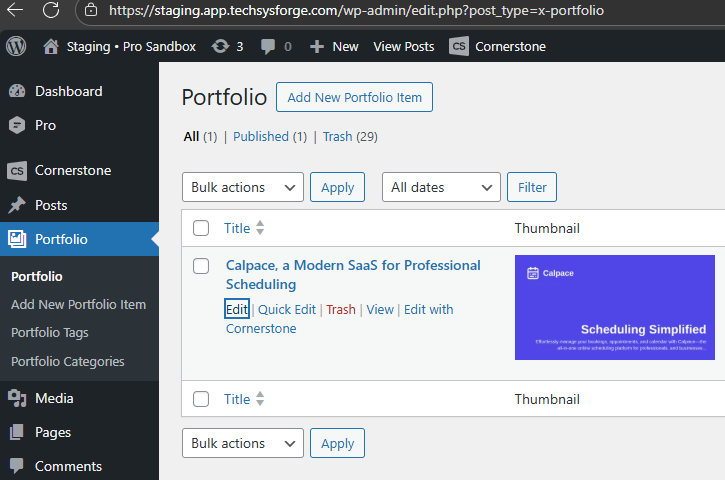
If you want to use Cornerstone to edit that item, as shown here:

Click the “Add Section” and design your new content for that portfolio item.
Be Aware that any existing contents created/edited with the default WordPress Editor WILL BE discarded and replaced with the new content you have created with Cornerstone.
Again, I would highly suggest that you create additional Portfolio Items first of at least two or more.
Hope this makes sense.
This doesn’t work as the template of the project for the single post type of this cpt, it just overlay sections on that and doesn’t actually edit.
Hey @abdurrehman,
I think you are still confused about how to add/edit a portfolio item now that you have a single portfolio item layout. Kindly check out these two videos I have made to demonstrate:
https://www.youtube.com/watch?v=kqV_vjg591g
https://www.youtube.com/watch?v=kWAyvZZRoIs
Hope this makes sense.
We have created a template and for the featured image defined a size and why the size isn’t getting applied to it? even in your own video?
So about the content we can either only add using the classic editor or write them using the CS. That’s what i see.
You said:
Where did you define the size. Kindly provide details and provide a screenshot and we’ll investigate why it’s not applied.
Right now, I’m seeing 100% Width and auto Height for the Image element displaying the Featured Image and that is correctly displayed. What are you expecting?

We aren’t going anywhere then and thread has become so long and what you’re asking me you’ve the information in the thread already. This is just becoming waste of time as have to explain again and again.
Hey @abdurrehman,
"We have created a template and for the featured image defined a size and why the size isn’t getting applied to it? even in your own video?"
Actually, the Single Portfolio template is displaying the featured image as expected. The width is 100% as well as the maximum width. In the sample portfolio items I added, the featured images are larger when they are displayed because there is NO height being set in the template. I assumed that your only basis for the featured image is the first “Calspace” portfolio item, without considering the other featured images of the future items that you may be adding.
Here’s what I think. There is a need to set a Height for the featured image. Or maybe, any featured image added must be with the correct size with at least 1200x630 pixel dimension.
"So about the content we can either only add using the classic editor or write them using the CS. That’s what i see."
Yes, you can only add another portfolio item with the WP Editor or with the Cornerstone. You cannot use the single portfolio layout to add or edit a single portfolio item.
I admit we are getting back and forth since you are not familiar with the single portfolio layout and how to edit each portfolio item. Once you have a grasp of it, I am sure everything will become a smooth process.
Best Regards.
This topic was automatically closed 10 days after the last reply. New replies are no longer allowed.