Hello there. Thanks for testing out @RueNel’s recommendations. Now we have eliminated a couple of possibilities.
I took a closer look at the screenshot you sent and it looks like you’ve used P as the tag for the headline. This is perfectly valid, of course.
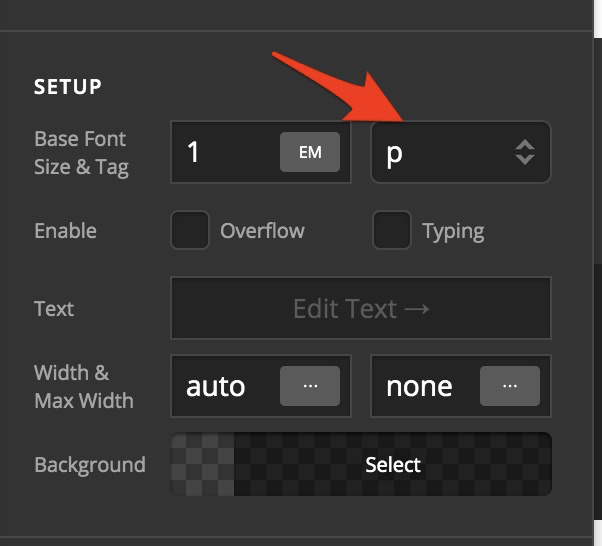
Now, can you check each headline element’s text by clicking on “Edit Text -->” and click the HTML tab…

If you see the text enclosed in <p> </p> tags like in the screenshot above, then there are two ways to solve it.
METHOD 1 - Delete all P tags
While editing the text, use the HTML mode (not the Rich Text mode which is the “T” icon in the screenshot above). Then delete all <p> and </p> tags you find.
You’ll have to do this to every single one of them.
METHOD 2 - Use <div>
This second method is way simpler because you won’t need to do any deleting.
Okay, so edit each headline, then select div as the tag instead of p.
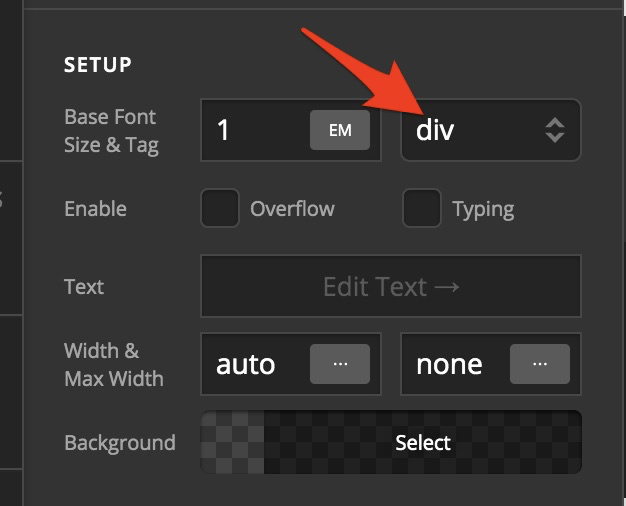
You’ll need to do this to each headline element under consideration.
I would recommend you go with this method as this is more maintainable for you going forward.
If none of these solutions worked, do reach out to us again. I think at this time, it would be better if you can send us your website URL along with its admin login details in a secure note. I’m confident you won’t need to do that, though but it’s expedient that you know what the next steps are in case our suggested approaches fail.


