6.8.0 problem: child theme style.css not loading

I’ve updated a few sites today and noticed this issue with all of them. Ultimately, I reverted to 6.7.13 and saw the problem go away immediately…

  1. Updated a site
  2. Noticed that an important style rule was not being applied
  3. Opened dev tools, rule nowhere to be found
  4. Checked that the element has the correct classname - it did
  5. Verified the selector and rules were in /wp-content/themes/pro-child/style.css - they were
  6. Checked parsed source code for style.css - this was not loading at all, nowhere to be found
  7. Removed all caching plugins to eliminate an issue with that - no change
  8. Reverted back to 6.7.13 - styles lit back up right away, source code confirmed style.css loading as expected

Any thoughts on this issue would be appreciated. Again, this happened across multiple sites and all have been reverted. There is therefore no link to provide where this issue is currently active.

Thank you!
1 Like

Did a little more digging and if I enqueue it manually, the problem does go away, obviously:

function the_scripts() { 
    wp_enqueue_style( 'do-the-thing', get_stylesheet_directory_uri() . '/style.css', [], null );
} 
add_action('wp_enqueue_scripts', 'the_scripts');

But, I should not have to do this. Any ideas whats going on here?

We’ll release a fix in the next point release. Have a great day.

1 Like

Thanks @charlie!

1 Like

I had this same issue and reverted my site back to the previous version. I then set up a staging site and re-installed 10.8.0 and as a test - added all of my style.css from my child theme to the global CSS and it DID fix ALL the issues. So apparently this is the only problem. (I also made sure the functions.php was loading fine from the child theme and it had no issues - it was only the stylesheet). I am using X on this particular site.

Hey @geekgoddessx,

Thanks for this information.

Cheers.

Same error here. Major bug! I hope for a swift fix!

We’ll have an update on Monday at the latest. It can be worked around by using the Starter stack.

even when the starter stack is the base css and the update was applied, some minor css issues occured. For example the body background color went from white to black…
This was the only one hick-up I realised yet. I’ll update more sites tomorrow. Or not. Wonder wonder…

Hey Ondrej,

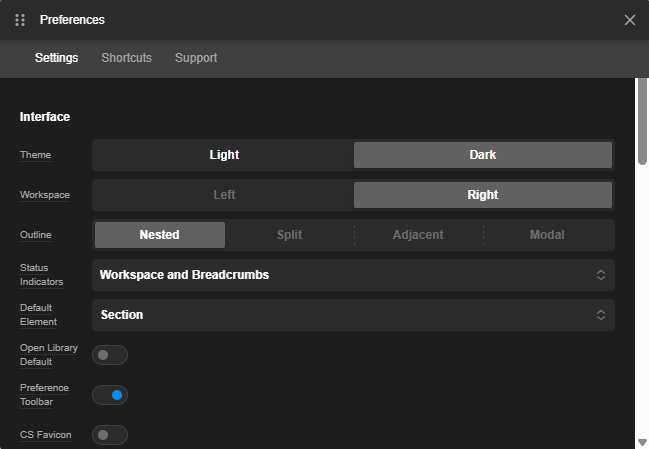
Have you checked the Light or Dark theme in Cornerstone Preferences?
image

When using the Blank stack, the body background color of the canvas in the builder will use the default browser theme (light or dark).

Hope this helps.

@ruenel: its light and was always this way. I had to set the background color to white in the general settings after the update. This was set to “transparent” for some reason. My browser has a dark theme active, so I guess it just used this as background.
It’s a minor thing, and when you know, where to look, its and nobrainer. But some folks may get confused.

Fixes are out now in 6.8.1. Let us know if you have any issues. Have a great weekend.

1 Like

I ran the x.8.1 update on my staging site (where I had updated to x.8.0 and seen the issue) and I can confirm x.8.1 fixed it. Thank you for super quick turnaround on this fix!

1 Like

I have updated 2 sites so far since the fix and can also confirm it is now working as expected.
Thank you @charlie!

1 Like

You are most welcome, guys.

This topic was automatically closed 10 days after the last reply. New replies are no longer allowed.