Tagged: x
-
AuthorPosts
-
April 15, 2016 at 12:31 pm #884575
 launchcatapultParticipant
Hi there!
I am doing development on a site at gok.flywhelsites.com and I am running into several issues. But first, a system rundown:
WP: 4.5
X: 4.4.2
Cornerstone: 1.2.4ALL plugins are updated to their latest available versions and have already been de-activated to see if that resolved the issue. It did not
1.I am implementing a custom tab structure for product pages which has been working fine. Now, after the latest WP an X update, when we go to a product page and click a tab, the page starts scrolling on its own and then completely glitches if I try and scroll the rest of the page. The tabs are also completely unelectable on mobile, and clicking them results in a similar glitch behavior. I checked to make sure the tab template is the latest woo-commerce template. The only changes I am making are naming and custom order, so my changes should not affect JS in anyway and again they were working before the updates. Here is an example url for a product:
The tab structure I have altered can be found in: x-child -> woocommerce -> tabs -> tabs.php
and I have made comments to anything I changed.
2. I am pulling in a product feed on the home page with a woo-commerce shortcode, and the add to cart buttons are broken. you can see this on the site home page. The select options button works, but not the add to cart button. The shortcode I am using is:
[featured_products per_page=”3″ columns=”3″]

3. The client wants to use a mega menu structure, so i tapped into the default X mega menu system, and now it appears there are float issues on some of the items. Can you please provide a fix for this? See the issue when you hover over something like Smart Home or More in the main nav.

Thank you so much for your help! See my next reply for login creds!
April 15, 2016 at 12:34 pm #884579launchcatapultParticipantThis reply has been marked as private.April 16, 2016 at 2:59 am #885400 ChristopherModerator
Hi there,
#1 Upon checking your site, I wasn’t able to replicate this issue.
Please see :
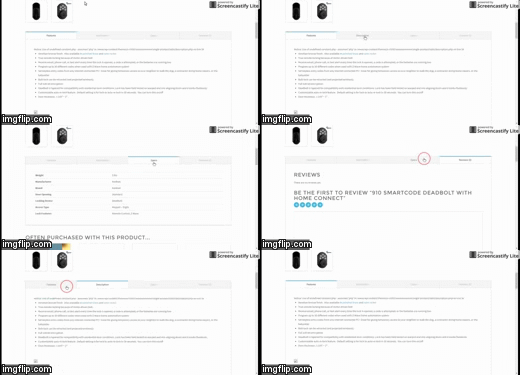
Please clear cache, check again and confirm me or let us know how we can replicate this issue.
#2 Current version of X is compatible with woocommerce v2.5.0, but you’re using woocommerce v2.5.5, please downgrade this plugin as this may fixes the issue.
#3 Please add following code in Customize -> Custom -> CSS :
.desktop .x-nav .x-megamenu.col-4>.sub-menu>li:nth-child(5n) {
    clear: none;
}
Hope it helps.
April 19, 2016 at 7:58 am #889961launchcatapultParticipantI am currently woking on backing up and downgrading woo-commerce! Regarding the X Tabs issue, try clicking back and forth between a few of them and then try and scroll the page. Mine is still glitching out on Local Dev and Live Dev. Also, on mobile, the tabs are completely un-clickable. They will not function.
April 19, 2016 at 9:39 am #890147launchcatapultParticipantAlso, I downgraded my WooCommerce install on my local dev to 2.5.0 and the add to cart buttons are still not working. Additionally, they are not working on See Related products sections. The shop page add to cart buttons are working, but no woocommerce shortcodes or feeds add to cart buttons are working.
April 19, 2016 at 4:57 pm #890839LelyModeratorHi There,
Upon checking, the tabs on desktop screen is working fine. I am able to check it using different browsers. http://screencast-o-matic.com/watch/cDfqru150K. Although, I can confirm that this tab is not working on mobile. Please check this thread for temporary fixed:https://community.theme.co/forums/topic/woocommerce-tabs-not-working-on-mobile/
Can you clear your cache? You might be seeing a cache content. I did check using different browser and the add to cart button on homepage and the add to cart button on related product section are working too. See the video screencast of my test here:http://screencast-o-matic.com/watch/cDfqrM15Zd
Hope this helps.
April 26, 2016 at 1:39 pm #900782launchcatapultParticipantI read through the thread you mentioned where the guy has the screen recording of the glitching tabs. That is exactly what my tabs are doing. It happens for me on all computers and in incognito mode. THe proposed solution in that thread involves editing X Core JS files which I really really don’t want to do. Have you guys released a fix for this yet?
It is a pretty urgent issue.
April 27, 2016 at 6:04 am #901904RadModeratorHi there,
Unfortunately, there is no fix available yet. Editing core requires recompilation and not something can be done through child theme. Unless, will hange the enqueue URLs but that requires changing all scripts too since they are minified.
Again, please stay tuned. And we’ll keep checkin on it.
Thanks!
April 27, 2016 at 10:21 am #902395launchcatapultParticipantHey Rad,
Thanks for the reply. I was able to get a temp fix from another staff member my replying to the other thread. I appreciate your help! I look forward to the update. Take care!
April 27, 2016 at 7:45 pm #903261Rue NelModeratorHello There,
Glad this has temporarily resolved. Once our developers placed a fix for this issue, it will be updated and will be rolled out in our release update.
Thank you for your understanding.
-
AuthorPosts
- <script> jQuery(function($){ $("#no-reply-884575 .bbp-template-notice, .bbp-no-topic .bbp-template-notice").removeClass('bbp-template-notice'); }); </script>
