Tagged: x
-
AuthorPosts
-
February 23, 2017 at 12:52 pm #1383279
 bradmacleanParticipant
Hello,
Having some performance issues with my site – will2walk.org. While trying to troubleshoot, i discovered a few inline Javascript assets (JS/CSS) being called for every one of my pages even though this javasript and CSS is only embedded on two pages. Attached are the requests from GTmetrix.com. Below is the embed code i’m using. The code embeds a form from Littlegreenlight ( donor management web application). Can you help understand why this is occurring and what we could do to make sure this javascript and CSS is only called on the pages in which it is required?Here are the inline javascript embed codes and respective pages that contain it:
https://will2walk.org/online-scholarship-application/
<script type=”text/javascript” src=”https://secure.lglforms.com/form_engine/s/zUz47GVC4gzVjCbDG1Fy2A.js”></script><noscript>Fill out my LGL form!<br/></noscript>https://will2walk.org/volunteer/
<script type=”text/javascript” src=”https://secure.lglforms.com/form_engine/s/JDKI9dlt2K0mXvDSarvUbg.js”></script><noscript>Fill out my LGL form!<br/></noscript>Thanks!
BradFebruary 23, 2017 at 9:24 pm #1383814 Rue NelModerator
Hello There,
Thanks for writing in! Because you have install WP Autoptomizer, the plugin minimized all the scripts into one. Unless other wise, you exclude the script, then it will just be loaded on that page only. If you consider performance important, you really should use one of the many caching plugins to do page caching. Some good candidates to complement Autoptimize that way are e.g. WP Super Cache, HyperCache, Comet Cache or KeyCDN’s Cache Enabler.
Hope this helps.
February 24, 2017 at 3:50 pm #1384701bradmacleanParticipantWhat are your thoughts of Wpengine’s CDN? Appears they partner with MaxCDN (formerly NetCDN). I set it up and appears to be helping.
February 24, 2017 at 11:19 pm #1385110Rue NelModeratorHello There,
Thanks for updating in! WPEngine’s CDN works out with X. More users are already using it. Meanwhile, Cornerstone and WPEngine doesn’t really go along much. The Cornerstone builder takes place on the front end, in most cases WP Engine tries to cache its resources. This can cause stale data to be loaded. To resolve this, you’ll need to clear the site cache in WPEngine right after saving every changes you made in Cornerstone.
How to purge the site cache
You can use our interactive tutorial, “What should I do if I make changes and they don’t take effect?“, in the User Portal, or you can follow the instructions below.
Purging your site cache is very easy. You just need to know where the button is located:- Long into /wp-admin/
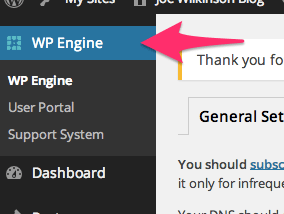
- Click on WP Engine button located at the left top side.
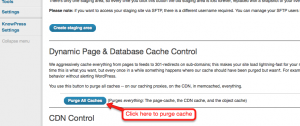
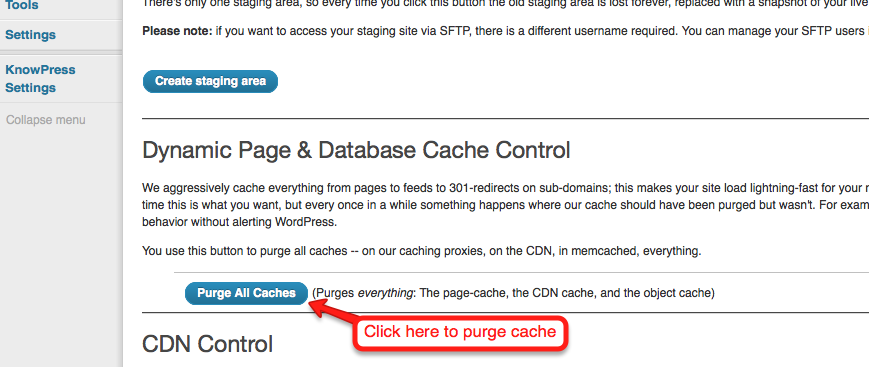
- Click “Purge all caches.”
Finally, clear your browser cache and refresh your page. Once you refresh the page you should notice that the content has updated. If it is still not updating, you may want to consider contacting support by creating a support ticket.To know more about WPEngine caching system, please check it out here: https://wpengine.com/support/cache/
February 26, 2017 at 7:17 am #1386127bradmacleanParticipantvery good. thanks!
February 26, 2017 at 7:35 am #1386143ChristianModeratorYou’re welcome.
-
AuthorPosts
- <script> jQuery(function($){ $("#no-reply-1383279 .bbp-template-notice, .bbp-no-topic .bbp-template-notice").removeClass('bbp-template-notice'); }); </script>
