Tagged: x
-
AuthorPosts
-
February 28, 2017 at 12:53 pm #1389151
 AnnParticipant
Hey there,
I’ve read several threads about the superfly menu and followed the instructions here https://community.theme.co/kb/integrated-plugins-superfly/ but I can’t seem to get the menu to appear on my page. I did clear the cache too but nothing.
Any idea what I might be doing wrong?
website: http://www.marketingofdesign.com/
Thanks!
Ann
February 28, 2017 at 12:55 pm #1389152AnnParticipantThis reply has been marked as private.February 28, 2017 at 1:04 pm #1389167AnnParticipantI’m sorry, I should clarify that I’m trying t use the full screen menu, but only on mobile device. I was able to get the menu button to appear on desktop but not mobile. I feel like I’m missing something super simple here…
February 28, 2017 at 7:28 pm #1389561 NicoModerator
Hi There,
Thanks for writing in.
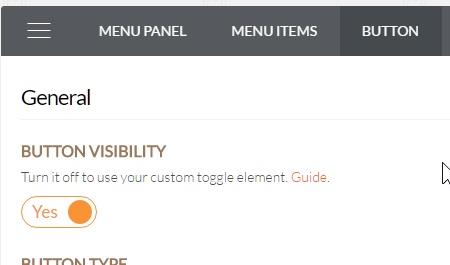
You will need to enable Button Visibility to enable Superfly on mobile
https://s3.amazonaws.com/community-themeco/app/uploads/2016/09/05092140/2016-09-05_22h20_45.png
Thanks.
March 1, 2017 at 12:29 am #1389813AnnParticipantYup, I know, and it’s be enabled all the time.
March 1, 2017 at 4:13 am #1390010LelyModeratorHi Anne,
Since Test mode during setup is set ton ON, please make sure to login via admin before visiting on mobile or better set this to OFF.
Hope this helps.
March 1, 2017 at 1:25 pm #1390776AnnParticipantHaha! I knew it was something so silly!
Thanks so much!
A couple of other things, reading through forums it seems like you can’t change the padding between menu items for the full screen superfly menu, is that correct? If not, how can I make it smaller?
I changed the button icon color under the button setting inside superfly, but for some reason it won’t appear. Is there a way I can force it using css instead?
Thanks again 🙂
Ann
March 1, 2017 at 9:33 pm #1391348LelyModeratorHi Ann,
Please try this:https://community.theme.co/forums/topic/superfly-full-screen-menu-item-size/#post-1120251 and adjust accordingly.
Regarding the button color, check this note: Not applicable if ‘Just Icon’ button style is selected. and try to mobile browser cache or check in Incognito mode.
March 2, 2017 at 3:33 pm #1392434AnnParticipantBummer it won’t work.
Okay thanks 🙂
March 2, 2017 at 5:50 pm #1392572AnnParticipantSorry, I had one more question to ask.. For some reason the font size on desktop is massive. I added the code below and it change the font on mobile but not desktop.
.sfm-pos-right #sfm-sidebar.sfm-vertical-nav .sfm-menu li a {
font-size: 24px !important;
}And it’s also a white color when you hover over each menu item that I can’t figure out how to change either.
Thanks!
Ann
March 3, 2017 at 12:51 am #1392977RadModeratorHi Ann,
You added that CSS within the @media block that targets mobile devices.
@media (max-width: 480px){
body .x-brand {
    margin-top: 40px;
    font-size: 15px;
    letter-spacing: 4px;
}
.sfm-pos-right #sfm-sidebar.sfm-vertical-nav .sfm-menu li a {
    font-size: 24px !important;
}
.x-btn-navbar {
    margin-top: 33px;
}
}
If you wish to apply it regardless of device, then move it out of the
@media { }block. As for color and hover color, please try this with your preferred color.sfm-pos-right #sfm-sidebar.sfm-vertical-nav .sfm-menu li a { color: #000 !important; } .sfm-pos-right #sfm-sidebar.sfm-vertical-nav .sfm-menu li a:hover { color: #ccc !important; }Hope this helps.
March 3, 2017 at 1:01 am #1392982AnnParticipantOhhhhh, I’m sorry! I didn’t quite get that. My bad.
Okay so the font is fine now, and I was able to change the font color on hover but the white background is still there. Is there no way to remove the solid white completely? I’d prefer to have no background color on hover if possible.
Thanks!
AnnMarch 3, 2017 at 2:56 am #1393069Rue NelModeratorHello Ann,
Thanks for updating in! I have checked your site and I could not find the white background color. Could you please send us some screenshot? Maybe I am looking in the wrong page or section.
Thank you in advance.
March 3, 2017 at 10:58 am #1393505AnnParticipantSorry for not being clear. It’s the hover color when you open the superfly desktop menu. See screen shot atatched.
Thanks!
Ann
March 3, 2017 at 9:48 pm #1394063RadModeratorHi there,
Please add this as well,
#sfm-sidebar .sfm-menu li > a:before {
    background: transparent;
}
Cheers!
-
AuthorPosts
- <script> jQuery(function($){ $("#no-reply-1389151 .bbp-template-notice, .bbp-no-topic .bbp-template-notice").removeClass('bbp-template-notice'); }); </script>