-
AuthorPosts
-
November 21, 2014 at 5:41 am #149803
 Tristan AParticipant
Hi all,
Here’s what I am trying to achieve: I want the featured image of posts to appear as background to the post title. Much like http://markmanson.net/artist-entrepreneur or http://tdeditordemo.wordpress.com/2014/06/10/reasons-for-traveling/
Having researched the knowledge base and the forum, I have come to the conclusion that this is not a feature of the theme. So i found this code (see below) that supposedly should do what I want, but I have no idea where to put it. Adding it to header.php doesn’t do anything. I am developing on XAMPP locally, so unfortunately I cannot link to my site. I am using the Ethos stack.
<?php
if (has_post_thumbnail()) { //if a thumbnail has been set
$imgID = get_post_thumbnail_id($post->ID); //get the id of the featured image
$featuredImage = wp_get_attachment_image_src($imgID, ‘full’ );//get the url of the featured image (returns an array)
$imgURL = $featuredImage[0]; //get the url of the image out of the array?>
<style type=”text/css”>.header-image {
border:none;
color:black;
background-image: url(<?php echo $imgURL ?>);}
</style>
<?php
}//end if?>
November 21, 2014 at 8:14 pm #150294 RadModerator
Hi Tristan,
Thanks for posting in.
This code may not work on X existing layout, and we can’t support applying this as. But I could help you with different workaround.
First, setup a sample post with big featured image, and our goal is to finish it something like this.
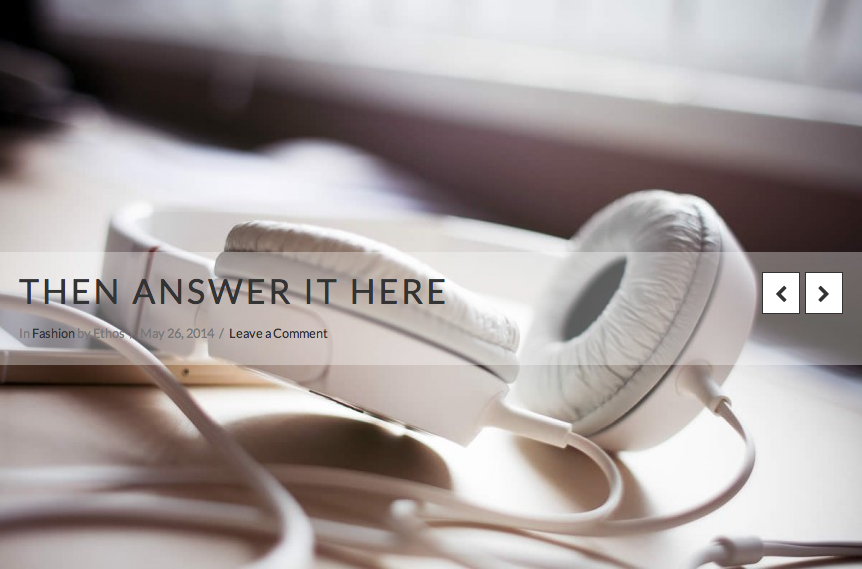
Because this requires a template change, I’d advise that you setup a child theme. This allows you to make code changes that won’t be overwritten when an X update is released. After your child theme is setup, please review how we recommend making template changes in Customization Best Practices.
1. Add this css at your customizer’s custom css under Admin > Appearance.
.single .has-post-thumbnail .entry-featured {
position: relative;
}
.single .has-post-thumbnail .entry-featured .entry-header {
position: absolute;
z-index: 99;
top: 45%;
width: 100%;
padding: 20px;
background-color: rgba(255, 255, 255, 0.35);
}
2. Create a file named content.php at your child theme (eg. wp-content ▸ themes ▸ x-child-ethos ▸ framework ▸ views ▸ ethos )
3. Edit your child theme’s content.php and add this code replacing everything.
<?php

// =============================================================================
// VIEWS/ETHOS/CONTENT.PHP
// -----------------------------------------------------------------------------
// Standard post output for Ethos.
// =============================================================================

$is_index_featured_layout = get_post_meta( get_the_ID(), '_x_ethos_index_featured_post_layout',  true ) == 'on' && ! is_single();

?>

<article id="post-<?php the_ID(); ?>" <?php post_class(); ?>>
  <?php if ( $is_index_featured_layout ) : ?>
    <?php x_ethos_featured_index(); ?>
  <?php else : ?>
    <?php if ( has_post_thumbnail() ) : ?>
      <div class="entry-featured">
        <?php if ( ! is_single() ) : ?>
          <?php x_ethos_featured_index(); ?>
        <?php else : ?>
          <?php x_featured_image(); ?>
          <?php x_get_view( 'ethos', '_content', 'post-header' ); ?>
        <?php endif; ?>
      </div>
    <?php endif; ?>
    <div class="entry-wrap">
      <?php if( !is_single() || !has_post_thumbnail() ) x_get_view( 'ethos', '_content', 'post-header' ); ?>
      <?php x_get_view( 'global', '_content' ); ?>
    </div>
  <?php endif; ?>
</article>
4. Save and upload.
Hope this helps 🙂
November 24, 2014 at 4:36 am #151455Tristan AParticipantExcellent, works!
Thank you so much for all the help!
Kind regards, Tristan
November 24, 2014 at 6:42 am #151536Tristan AParticipantIn the meantime, I decided to switch over to the Integrity stack and as I am using Integrity Light, I have set up the Integrity Light Stack as per your instructions in the knowledge base.
What would this PHP code look like for the Integrity Light child theme? Replacing ‘ethos’ for ‘Integrity’ doesn’t do the trick 🙁
Thanks again!
November 24, 2014 at 9:12 am #151686ZeshanMemberHi Tristan,
Thanks for writing in! To assist you with this issue, we’ll first need you to provide us with your URL as stated on the forum entrance page. This is to ensure that we can provide you with a tailored answer to your situation. Once you have provided us with your URL, we will be happy to assist you.
Thank you.
November 24, 2014 at 10:37 am #151749Tristan AParticipantUnfortunately, I am building the site on a local development server, so I would not be able to provide you with a URL that you can access. Please note that I have not made any modifications to the (child) theme, other than adding in the CSS code as provided by you (see above).
thank you,
November 24, 2014 at 3:22 pm #151950FriechModeratorHi Tristan,
since the principles above works for your site, we can use also follow that for Integrity,
Because this requires a template change, I’d advise that you setup a child theme. This allows you to make code changes that won’t be overwritten when an X update is released. After your child theme is setup, please review how we recommend making template changes in Customization Best Practices.
1. Add this css at your customizer’s custom css under Admin > Appearance.
.single .has-post-thumbnail .entry-featured {
position: relative;
}

.single .has-post-thumbnail .entry-featured .entry-header {
	font-size: 14px;
	position: absolute;
	top: 45%;
	width: 100%;
	background-color: rgba(255, 255, 255, 0.35);
	padding: 20px;
}
2. Create a file named content.php at your child theme (eg. wp-content ▸ themes ▸ x-child-integrity-light ▸ framework ▸ views ▸ integrity )
3. Edit your child theme’s content.php and add this code replacing everything.
<?php

// =============================================================================
// VIEWS/INTEGRITY/CONTENT.PHP
// -----------------------------------------------------------------------------
// Standard post output for Integrity.
// =============================================================================

?>

<article id="post-<?php the_ID(); ?>" <?php post_class(); ?>>
  <div class="entry-featured">
    <?php x_featured_image(); ?>
    <?php x_get_view( 'integrity', '_content', 'post-header' ); ?>
  </div>
  <div class="entry-wrap">
    <?php x_get_view( 'global', '_content' ); ?>
  </div>
  <?php x_get_view( 'integrity', '_content', 'post-footer' ); ?>
</article>
4. Save and upload.
hope this also works for your site.
November 26, 2014 at 6:24 am #153137Tristan AParticipantThank you! Works!
November 26, 2014 at 11:09 am #153348John EzraMemberYou’re welcome! Contact us for support anytime!
May 10, 2015 at 5:32 am #270046Tristan AParticipantThis seems to have stopped working now? Perhaps with one of the theme updates?
May 10, 2015 at 5:44 am #270051ChristopherModeratorThanks for writing in! To assist you with this issue, we’ll first need you to provide us with your URL. This is to ensure that we can provide you with a tailored answer to your situation. Once you have provided us with your URL, we will be happy to assist you with everything.
May 10, 2015 at 2:10 pm #270224Tristan AParticipantThis reply has been marked as private.May 10, 2015 at 7:25 pm #270330Rue NelModeratorHello There,
Sorry we could not log in to your site using the information you gave.
For the meantime, please confirm that changes we gave here: https://theme.co/x/member/forums/topic/featured-image-as-background-to-post-title/#post-151950 has made into your child theme.
Please make sure that customizations is being place in the child theme. This allows you to make code changes that won’t be overwritten when an X update is released. After your child theme is setup, please review how we recommend making template changes in Customization Best Practices.
Thank you.
May 10, 2015 at 7:25 pm #270331Rue NelModeratorHello There,
Sorry we could not log in to your site using the information you gave.
For the meantime, please confirm that changes we gave here: https://theme.co/x/member/forums/topic/featured-image-as-background-to-post-title/#post-151950 has made into your child theme.
Please make sure that customizations is being place in the child theme. This allows you to make code changes that won’t be overwritten when an X update is released. After your child theme is setup, please review how we recommend making template changes in Customization Best Practices.
Thank you.
May 11, 2015 at 1:39 am #270508Tristan AParticipantThis reply has been marked as private. -
AuthorPosts
- <script> jQuery(function($){ $("#no-reply-149803 .bbp-template-notice, .bbp-no-topic .bbp-template-notice").removeClass('bbp-template-notice'); }); </script>
