Tagged: x
-
AuthorPosts
-
April 11, 2016 at 8:36 pm #877437
 pablomalatinoParticipant
Hi,
I’m using Icon10. I’m trying to set up One page navigation using [content_band]. Where should I put the [content_band] shortcode, before [x_section] o after [x_section]. Please refer to the example below:
[content_band]
[x_section parallax=”false” bg_image=”http://placehold.it/1500×750/0d0d0d/1f1f1f” class=”center-text ” style=”margin: 0px 0px 0px 0px; padding: 12.5% 0px 12.5% 0px; “]
[x_row inner_container=”true” marginless_columns=”false” bg_color=”” style=”margin: 0px auto 0px auto; padding: 0px 0px 0px 0px; “]
[x_column bg_color=”” type=”1/1″ style=”padding: 0px 0px 0px 0px; “]
[x_image type=”none” src=”http://placehold.it/400×200/ffffff/0d0d0d” alt=”Placeholder” link=”false” href=”#” title=”” target=”” info=”none” info_place=”top” info_trigger=”hover” info_content=”” class=”man”]
[/x_column]
[/x_row]
[/x_section]
[/content_band]April 12, 2016 at 5:57 am #878045 LelyModerator
Hello There,
Thanks for posting in.
Please note that you don’t have to use content band anymore. We have switch to section. For backward compatibility it is still supported but we’re using sections now. Remove this[content_band]and this[/content_band]You may now use section id. Please check this:https://community.theme.co/kb/how-to-setup-one-page-navigation/ > Check Cornerstone part.Hope this helps.
April 12, 2016 at 1:29 pm #878718pablomalatinoParticipantThanks!
Could you write in the example below where I have to put the Id <div id=”x-content-band-1″> … </div>?
[x_section parallax=”false” bg_image=”http://placehold.it/1500×750/0d0d0d/1f1f1f” class=”center-text ” style=”margin: 0px 0px 0px 0px; padding: 12.5% 0px 12.5% 0px; “]
[x_row inner_container=”true” marginless_columns=”false” bg_color=”” style=”margin: 0px auto 0px auto; padding: 0px 0px 0px 0px; “]
[x_column bg_color=”” type=”1/1″ style=”padding: 0px 0px 0px 0px; “]
[x_image type=”none” src=”http://placehold.it/400×200/ffffff/0d0d0d” alt=”Placeholder” link=”false” href=”#” title=”” target=”” info=”none” info_place=”top” info_trigger=”hover” info_content=”” class=”man”]
[/x_column]
[/x_row]
[/x_section]April 13, 2016 at 1:16 am #879453ChristopherModeratorHi there,
You don’t need to add
x-content-band-1to your code.Sections automatically generate ID, so you don’t have to add ID if you want to use default one which is
x-section-1in your example. You should add#x-section-1in menu item’a URL field to target this section.In case you want to use custom ID add
id="custom-id"attribute to[x_section]shortcode:[x_section id="custom-id" parallax="false" bg_image="http://placehold.it/1500×750/0d0d0d/1f1f1f" class="center-text " style="margin: 0px 0px 0px 0px; padding: 12.5% 0px 12.5% 0px; "] [x_row inner_container="true" marginless_columns="false" bg_color="" style="margin: 0px auto 0px auto; padding: 0px 0px 0px 0px; "] [x_column bg_color="" type="1/1″ style="padding: 0px 0px 0px 0px; "] [x_image type="none" src="http://placehold.it/400×200/ffffff/0d0d0d" alt="Placeholder" link="false" href="#" title="" target="" info="none" info_place="top" info_trigger="hover" info_content="" class="man"] [/x_column] [/x_row] [/x_section]Instead of using shortcodes, I recommend you to create your pages with cornerstone which is faster and easier.
You can add sections with one click in CS and also you can set custom ID easier.See :
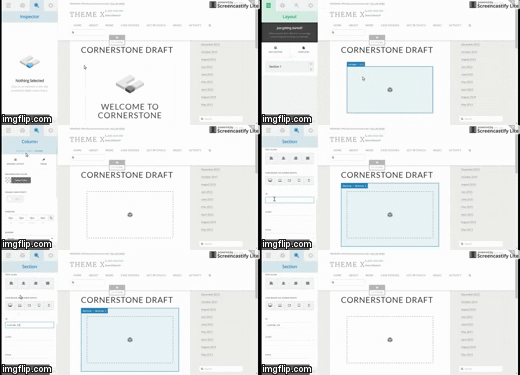
To learn more about cornerstone, check this link : https://community.theme.co/kb/
Hope it helps.
April 13, 2016 at 12:16 pm #880428pablomalatinoParticipantExcellent!
Thanks!!!April 13, 2016 at 3:51 pm #880832Prasant RaiModeratorYou are most welcome. 🙂
-
AuthorPosts
- <script> jQuery(function($){ $("#no-reply-877437 .bbp-template-notice, .bbp-no-topic .bbp-template-notice").removeClass('bbp-template-notice'); }); </script>
