-
AuthorPosts
-
January 13, 2015 at 2:04 pm #182244
 clearchiroParticipant
Hi,
I’m using the Lato font on our website http://clearchiro.com, and the customizer says it is in “regular” font weight but it is being shown in italics in the body and content. No matter which font weight I select the body content of my website and blog always stays in italics, which I don’t want. I’m using the latest version of WordPress and X theme.Thanks.
January 14, 2015 at 5:08 am #182633 Paul RModerator
Hi,
In that case, would you mind providing us with login credentials so we can take a closer look? To do this, you can make a post with the following info:
– Link to your site
– WordPress Admin username / password
– FTP credentialsDon’t forget to select Set as private reply. This ensures your information is only visible to our staff.
January 16, 2015 at 1:30 pm #184639clearchiroParticipantThis reply has been marked as private.January 17, 2015 at 5:20 pm #185276RadModeratorHi there,
It’s because your elements are wrapped by
<i></i>which makes texts italic.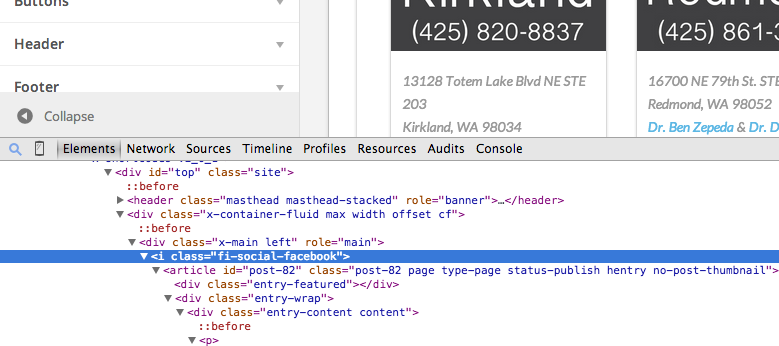
Remove it and it should be okay :), I tried but I can’t find it, could be from your custom templates or plugins.
You could try testing for a plugin conflict. You can do this by deactivating all third party plugins, and seeing if the problem remains. If it’s fixed, you’ll know a plugin caused the problem, and you can narrow down which one by reactivating them one at a time.
Or, temporary renaming your custom templates to see if it will your issue.
Cheers!
January 20, 2015 at 1:20 pm #187085clearchiroParticipantA-ha! Found it. Thanks so much!
January 20, 2015 at 10:25 pm #187325ChristianModeratorGlad you’ve sorted it out. 🙂
-
AuthorPosts
- <script> jQuery(function($){ $("#no-reply-182244 .bbp-template-notice, .bbp-no-topic .bbp-template-notice").removeClass('bbp-template-notice'); }); </script>
