V2 Tab Element: linking to tabs internally and externally

Will the following approach, to link to classic tabs internally, work when using the new V2 Tab element as well? https://theme.co/apex/forum/t/classic-tab-links-partially-working/28066 Could you highlight the adjustments that should be made for the V2 element and/or recommend a different approach? Requirement: At the bottom of each tab content pane I’d like to have a hyperlink to the next tab so they don’t have to scroll back up to get to the next tab.

As a separate requirement, I’d also like to be able to link to a tab from outside the page. Can you provide the JS and instructions to do that as well? Thanks much for your support!

Best,
Brad
Hi @bradmaclean,

Thanks for reaching out.

It will not work as the classic one has a different structure, but the idea should be the same. Trigger the click of the tab based on ID. Something like this,

jQuery( function($){ 
  $( window ).on('load resize', function(){
    scroll_to_tab ( location.href.split("#").slice(-1)[0] );
  });

  $('.link_tab').on('click', function() {
    scroll_to_tab( $(this).attr('href').split("#").slice(-1)[0] );
  });

  function scroll_to_tab ( tab_id ) { 
      $( "#" + tab_id ).trigger('click');
      $('html,body').stop().animate({scrollTop: $( "#" + tab_id ).offset().top - ( $('.x-navbar').height() + 50 ) },700 ,'swing');
    }
  });

Which of course, you’ll need to link it as example.com/page_name/#tab-1, example.com/page_name/#tab-2, and so on to target specific tab. And if you’re linking the button to a tab within the same page, then it’s the same, add link_tab to the button/link class with URL of tab ID.

Example,

<a href="#tab-1" class="link_tab">Link to First Tab</a>

This should serve as a guide and to give the idea of how it can be done. You may enhance it but we can’t provide further customization regarding this. I also tested it on my v2 tab and it works okay.

Hope this helps.

Thank you very much, Rad. I will give his a try today and let you know how it goes! Best, Brad

You’re most welcome!

Hi Rad,
Update: it partially works for both scenarios and has some issues…

Scenario #1: External (link direct tab externally)
If you click the following link from outside the page - https://jviinc.wpengine.com/about/#tab-18 - then it is working as expected; user is taken the page, auto-scrolls to the tab element, and auto-selects the correct tab. ISSUE: Once this is done, I am unable to to scroll up and down the page or click the other tabs. I’m stuck on that tab. Is there a small tweak you can offer to resolve this?

Scenario #2: Internal (Link to tab from within page)
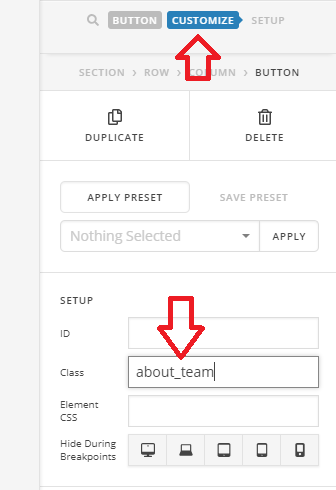
I added a button element to the page and added the class (about_team) to the button and also added the URL(https://jviinc.wpengine.com/about/#tab-18) to the button as recommended. ISSUE: It scrolls down to the Tab Set as expected but is not selecting the tab. Any advice?
Thanks!

Here’s the JS I’m using:

jQuery( function($){ 
  $( window ).on('load resize', function(){
    scroll_to_tab ( location.href.split("#").slice(-1)[0] );
  });

  $('.about_team').on('click', function() {
    scroll_to_tab( $(this).attr('href').split("#").slice(-1)[0] );
  });

  function scroll_to_tab ( tab_id ) { 
      $( "#" + tab_id ).trigger('click');
      $('html,body').stop().animate({scrollTop: $( "#" + tab_id ).offset().top - ( $('.x-navbar').height() + 50 ) },700 ,'swing');
    }
  });

Hi @bradmaclean,

  1. It’s working on my test page, perhaps there is something that triggers the resize or window load infinitely. You could try changing this

$( window ).on('load resize', function(){

to this

$( window ).on('load', function(){

or to this

$( document ).ready( function(){

  1. As per instruction, you should add link_tab to the button or link class, and in your case, it’s the about_team.

I also recommend disabling the plugins and other custom javascript codes, there could be conflicts as these codes alone works on my installation. If there are any conflicts, I recommend contacting a developer to fix further issues.

Thanks!

Thx Rad. You are right - looks like there is a conflict with the custom JS code listed below. When I remove, it works as advertised. I use this custom JS code to get Essential Grid shortcodes to load properly in the Tabs ; therefore, I can’t do without it. Is there a way to get both of these to work? Thanks a ton for your support!! Best, Best

jQuery('body').on('click', '.x-tabs-list ul li button', function() {
	setTimeout(function(){
		jQuery(window).trigger('resize');
	}, 500); //change 500 to your needs
});

Got it to work! I’m good. Thx again Rad for all your support!! :slightly_smiling_face:

Glad you were able to resolve it :slight_smile:

This topic was automatically closed 10 days after the last reply. New replies are no longer allowed.