Space around content and sidebar

Hey folks. I am using Ethos with a boxed layout. My content area and sidebar area have a lot of white space outside of them. Its like they are pushed together in the middle instead of spread out evenly and it looks bad. I would like to get the space to the left of the content area lessened and the space to the right of the sidebar area reduced as well. My site is istandardproducers.com. I’m sure the answer is in css but I can’t find the exact thing to edit and I haven’t found an answer in the support forums. Thank you in advance.

Hi There,

Thank you for writing in, yes it is caused by a custom CSS, please find this custom CSS on Theme Options > CSS

.x-container.width {
    width: 80%;
}

If its not there please look on your Header > CSS area.

Remember to clear all your caching features (plugin, server-side, CDN, and browser’s cache)

Let us know how it goes,
Cheers!

looks the same. the problem is still the large amounts of space pushing both to the middle

Hello @istandard,

Thanks for updating the thread.

You can try following code under Pro > Theme Options > CSS:

.x-container.width {
    width: 95%;
}

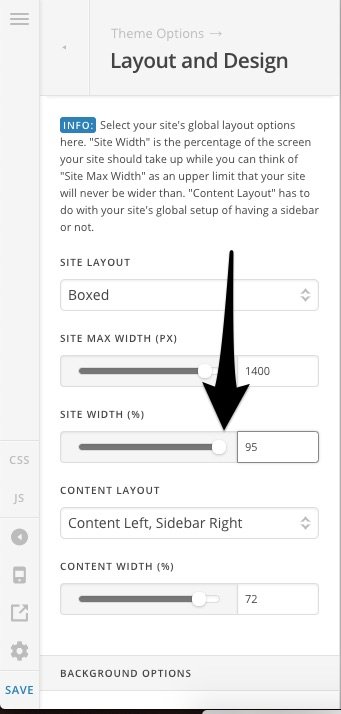
Or you can change the values from Pro > Theme Options > Layout and Design > Site Width (%) to 95%. Please clear browser cache and see how it goes.

Thanks.

1 Like

and there we have it. Thank you Prasant!

You are most welcome. :slight_smile:

This topic was automatically closed 10 days after the last reply. New replies are no longer allowed.