Post carousel in Ethos on Pro

One of the main features of this theme to me is the post carousel. I switched over to Pro because I want to use the header feature. However, the PC doesn’t work. I found a thread - https://theme.co/apex/forum/t/post-slider/2670/2 - that says you have to use the default header to utilize the PC. But that’s not even working for me.

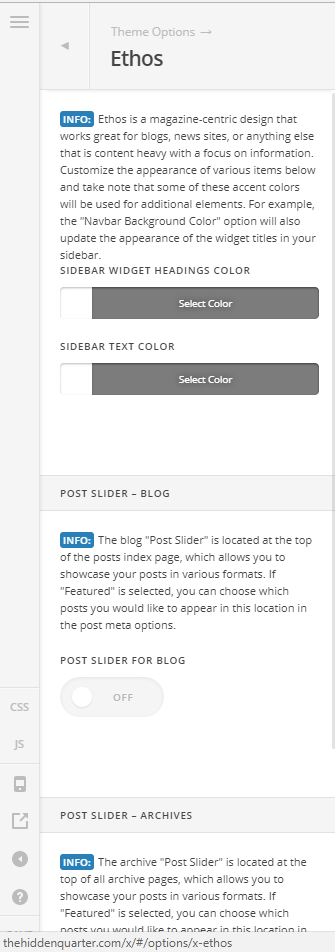
In this post is says to go to (Pro > Launch > Options > Ethos > Post carousel) to enable. I don’t have that option, I only see the post sliders. The only place I see the PC option is under Apperance>Customize>Ethos.

I’ve cleaned out my cache. I’m running current everything. I’ve disabled all plug-ins. I’ve scoured the KB and forums for help.

Is this feature no longer compatible with Pro because of the new header?

http://thehiddenquarter.com

Hi,

You should be able to see it under Pro > Launch > Theme Options > Ethos > Post carousel

Do you mind checking again.

If it still doesn’t show up, kindly provide us your wordpress admin login in Secure Note.

Thanks

This is what I see. (in both Pro and it’s child)

Hello There,

Thanks for providing the information. It turns out that you are using a custom header. Post carousel is only available with the default header. You will have to switched back to the default header if you want to have a post carousel.

Hope this explains it briefly.

Okay, I kept selecting default under the templates. I see you mean that we are to delete our headers and select the default one that shows up. That should be made a little more clear.

When I edit the default it does me no good. The PC goes away.

UPDATED AGAIN: When you say Default Header do you really mean the original header before the Pro upgrade?

Hi,

Yes, the standard xtheme header.

You need to disable the pro headers for the standard header to show up.

Thanks