Navigation Collapsed - Nested Sub Links Broken

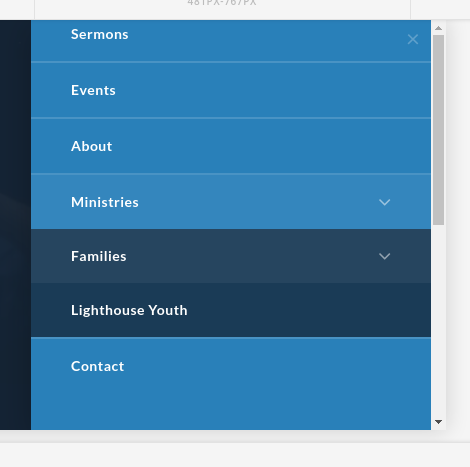
When using nested sub-menus the Navigation Collapsed item appears to break. When you click the first level sub item it appears to expand as it should, but the inner box is only equal to the height of the first level of sub items.

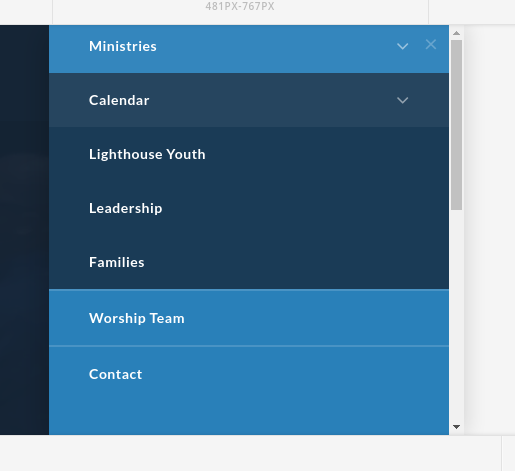
EG if you have two top level sub items, and two items in the first sub item. The box will not expand to show all 4 items, you will only see the first nested item. But if you leave the second level open, and close / re-open the first sub-level it is a little better but the second item from the top sub-level is hidden.

By default it’s also not very easy to determine which items are part of the nested sub-item. But that is something I should be able to take care of with custom css. It appears the javascript for this element is not calculating or applying the height values properly for nested menus.

You can see it in action here: https://oakhillag.bitstorm.pro/
(toggle is hidden on larger screens)

Opening both sub levels:
Closing and re-opening only the first level:
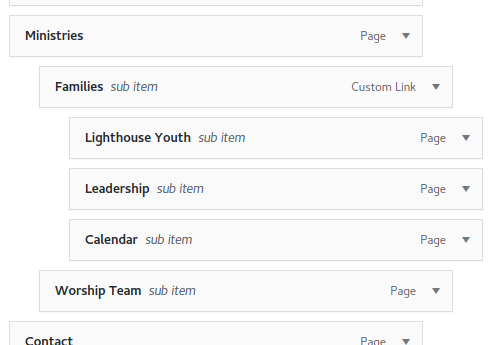
Layout of the example menu:
1 Like

Hey there,

This is a known issue and is currently being investigated. Please stay tuned for updates. For now, it would be best not to use third level menu.

Thanks.

Something else I have noticed is for some reason the menu toggle for the navigation collapsed does not function on iOS devices. When you tap on the toggle it does not open the menu. At least not in my implementation. I’ve included a secure note, if you need access to the site.

Please update Pro to the latest version first. See https://theme.co/changelog/. After that, check if the issue persists.

Thanks.

The only update was for 1.1.1 which has nothing to do with this issue. Still I applied the update anyway, and confirmed the toggle is still broken on iOS devices.

Hello There,

I can confirm that this is still an on going issue. Hopefully the next update release will soon arrive to fix this issue.
Please do watch out for it. It will be out in the next few days.

Thank you for your understanding.

1 Like

I’d like to add my concerns to this issue too.

Please keep us updated on when this issue will be resolved.

bump!

The issue persists.

No update at https://theme.co/changelog/

Please keep us posted.

Hi @Askeam,

Thanks for writing around! Developers are already working on it and the fix will be released soon. In the mean time you can add the following CSS code in the Theme Options > Global CSS or in the Customizer via Appearance > Customize > Custom > Edit GLOBAL CSS to fix the issue:

[data-x-collapse="opening"]>ul.sub-menu {
    overflow: auto !important;
    height: auto !important;
}

Hope this helps!

Thank you, Nabeel.

This fix works, but it has a strange side-effect of negating transition animation on opening a sub-menu.

When you open a sub-menu — it opens instantly (transition is lost), but when you close it, it closes with an animated transition.

If I remove your code from Global CSS opening transition is enabled again.

How do we get opening transition back with your code?

Thank you.

Hi again,

Getting the transition back with the above fix might not be possible, this is only a temporarily solution until the fix is released. As mentioned earlier developers are already working on it. Fix will be released soon.

Thank you for understanding!

Thank you, Nabeel.

As long as developers are aware of the broken transition issue — everything worked out fine.

You’re most welcome!

Thanks for that - it works. Would love to see a proper fix of course.

Glad it helped you as well.

Cheers!