We have a website using the Ethos stack. The whole website is complete except for the blog page. We want the blog page styled like http://demo.theme.co/ethos-1 but we don’t want to load all of ethos-1 under X>Demo Content>Setup Demo Content because we don’t want to mess up the rest of our site. We only need a template for the blog. How do we go about doing that?
HI there,
Thanks for writing in!
If you are using Ethos Stack. the blog page should look like this. If not please do required setup in theme option ethos section.
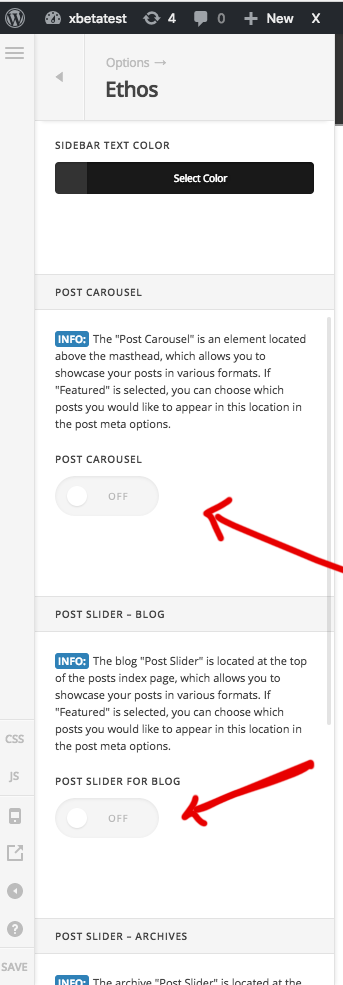
Let us know oh it goes.
Thanks
Thanks @basanta. One of the main problems is that images are not appearing until after a post is clicked. So basically, our blog looks like just a bunch of blank thumbnails with titles. After a blank thumbnail is clicked, however, the image is visible within the post. Any ideas?
Hi There,
First, the Ethos 1 demo Blog layout is set as Standard. Your current site Blog layout is set to Masonry (2 Columns). You can change that under Theme Options > Blog.
About the post Image, I see that you added the images as RAW Content. Please add your Image as the Post’s Featured Image.

On Ethos 1 demo Blog you can see that there is also a short text (called excerpt), please also add an excerpt to your posts.

Hope it helps,
Cheers!
Thank you @friech. The “Excerpt” and “Author” options are not displaying on our Post Settings. Is there something we’re overlooking?
Hi There,
The author, date, and categories are post meta data. You can enable it under Theme Options > Blog > Post Meta.
If you don’t see the excerpt meta box on your end, please press the Screen Options on the upper right, and check the excerpt box.

Hope it helps,
Cheers!
This topic was automatically closed 10 days after the last reply. New replies are no longer allowed.