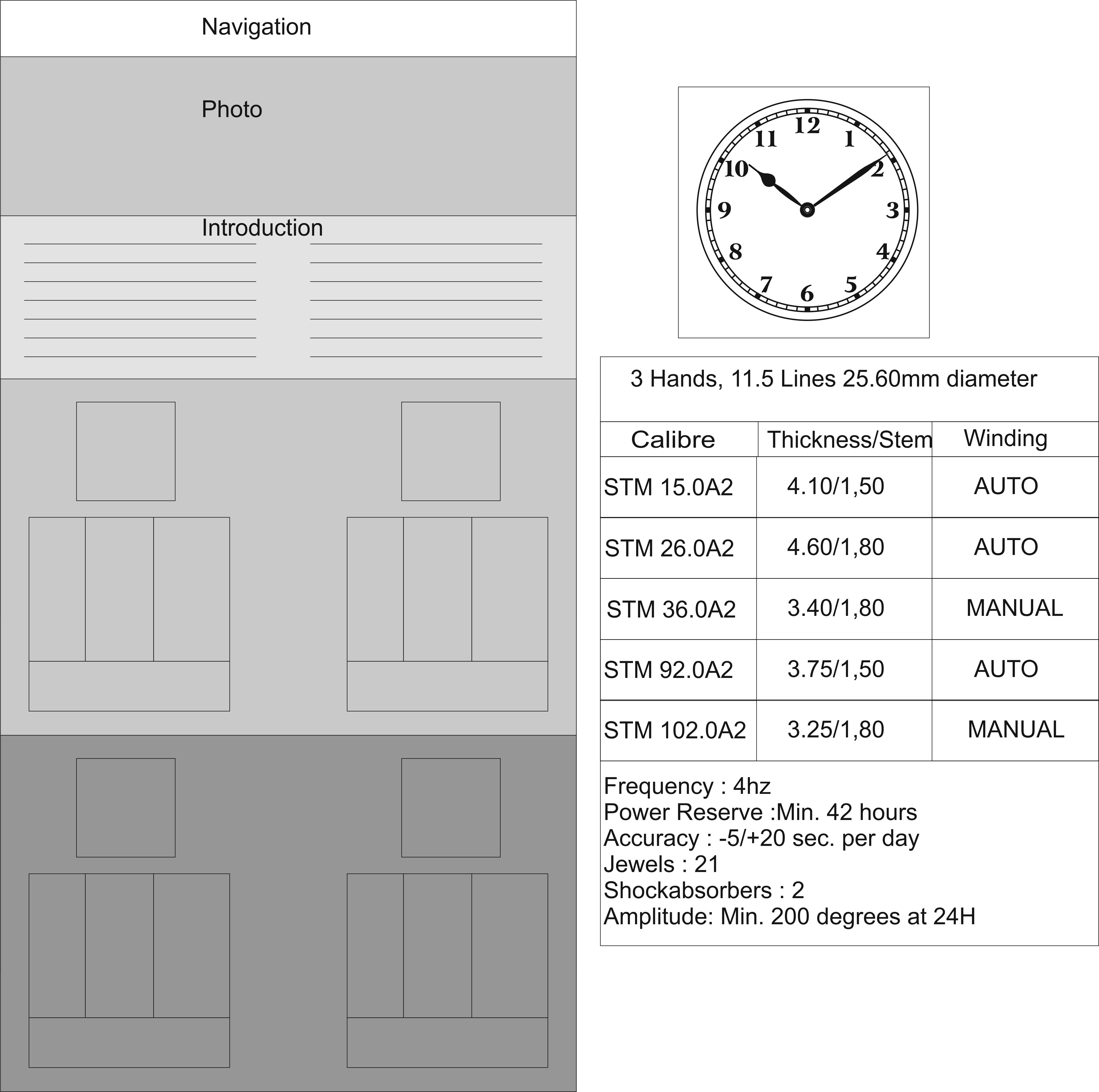
How to setup this type of Layout

Can anyone help me to setup the one page layout like this. Layout is in Left Section & Right given content of each 4 section just below the introduction.

Here is my page link:

http://signstimemovements.com/devwp/movements/

I setup the Photo & Introduction section, Under that I added the 2 Content Band that divided the row into two section, so section is setup main issue is how to setup the Table & image on top of table of each section.

Thanks!

Hello There,

Thanks for writing in! You will need to set up your section and rows. In each of the row, divide it into two columns. In this column, you can do the following:
1.) Set the column settings like align it to the center;
2.) Insert an image element for the clock
3.) Insert a text element for your sub heading text
4.) insert a raw content element so that you will insert your table;

<table class="my-table">
	<tbody>
		<tr>
			<td>Calibre</td>
			<td>Thickness/ Stem</td>
			<td>Winding</td>
		</tr>
		<tr>
			<td>STM 15.0A2</td>
			<td>1.40/1.50</td>
			<td>Auto</td>
		</tr>
		<tr>
			<td>STM 15.0A2</td>
			<td>1.40/1.50</td>
			<td>Manual</td>
		</tr>
	</tbody>
</table>

5.) And also insert the following custom css in the settings tab, Settings > Custom CSS

.my-table td {
    border: solid 1px #e5e5e5;
}

6.) And lastly, you will also insert another text element and insert addition description.

Hope this helps.

Thanks for the reply, I did that already, how to do column settings like align it to the center??? Also I want to add the Border around my image, how can we do that. Also is that any option to put any text on the image??

I found there is option to add title on image setting, I added the title, added the info Popover, also added the info content, but there is nothing showing on frontend?? Why??

See this screen shot.

Hi There,

You can add a CLASS center-text to your columns so it will center align

Add the border attribute to your Image’s STYLE field.

You can place your image as a background-image of the column.

Hope it helps,
Cheers!

Thanks for the reply, How to add background image into the colomn, not found any option in column setting. When I edit the Col, there is no option to add background image.

Hello There,

Thanks for updating in! With Visual Composer integrated in X, you can only insert a background image using inline css. Find the style field in the Column Settings and insert inline css like this background-image: url(http://placehold.it/1200x800/efefef);

If you are using vanilla version of Visual Composer, you should be able to insert it easily in the Design tab of the column settings:

If you want to use vanilla version, you must disable the x integration by going to Visual Composer > X Integration. For more details how we have integrated this plugin in X, please check this out:

Hope this helps.

How to Setup this type of Contact us page??

http://demo.theme.co/integrity-7/pages/contact/

I try to setup something like this, here on my demo site:

http://signstimemovements.com/devwp/contact-us/

But google map is not showing it’s showing any javascript error, Can you tell me how to add Title like this?? Like Why Us & Line on Right of that??

I checked that map in Browser Console, its showing me following error:

“Google Maps API error: MissingKeyMapError https://developers.google.com/maps/documentation/javascript/error-messages#missing-key-map-error” js:35:315

“Google Maps API warning: NoApiKeys https://developers.google.com/maps/documentation/javascript/error-messages#no-api-keys” util.js:222:12

Seems like we need to add API Key somewhere. Please help, we have launching in a day.

Rajesh

Hi There,

The Cornerstone’s Custom Headline element has that option called accent, but since you hard-coded your h3 headline, please update that to this:

<h3 style="text-align: center;" class="h-custom-headline accent"><span>Get In Touch</span></h3>

Notice the CLASS h-custom-headline accent added and the Get In Touch is wrapped in a <span> tag.

Regarding the Google Map, please create your Google Map API key, and then use this shortcode for adding the maps.

[x_google_map api_key="API KEY HERE" lat="40.7056308" lng="-73.9780035" zoom="12" zoom_control="true" drag="true" height="300px" hue="false" no_container="true" ][/x_google_map]

I strongly advice that you utilize Cornerstone for creating pages, so you can have the full feature of X.

Thanks,

When we try to add any thing using cornerstone, its showing nothing on fronend, even its showing on backend.

See this page.

http://signstimemovements.com/devwp/contact-us/

Sorry Check this page, this is created using Cornerstone.

http://signstimemovements.com/devwp/contact-us-2/

I added sections, then rows & added element, but its not showing on frontend.

Hi there,

That’s not a page, it’s an attachment page. When you upload an image, Wordpress will then use its file name as URL, hence, the only way to use the URL for your page again is deleting that image in Admin > Media > Library.

Please don’t use file names that you think will be later used as a title of your post/page.

Thanks!