Custom navbar underline follow up

Hello-

I can’t reply to the previous topic, but this was addressed here:

I am successfully using a custom image as the underline for active menu items- woo!

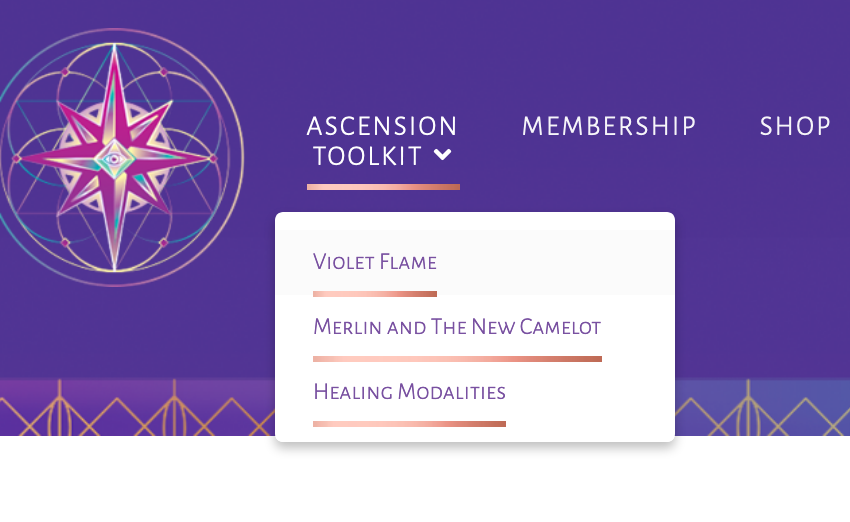
Having a problem now, where when the parent menu item is active, all the submenu items have the underline under them too.

Here’s a screenshot- in the case here Ascension Toolkit is active and the underline is showing for all the sub menu items:
Here is the code:
li.menu-item a:hover span,
li.current-menu-item a span {
border-bottom: 3px solid transparent;
padding-bottom: 7px;
border-image:url(https://alisonljames.com/wp-content/uploads/2019/06/Merlin-page-indicator.png) 30%;
}

Look forward to your response. I will leave a secure note with login.

Hi Kim,

Thank you for reaching out to us. To fix the issue, please replace your code with the following:

li.menu-item > a:hover > span, li.current-menu-item > a > span {
    border-bottom: 3px solid transparent;
    padding-bottom: 5px;
    border-image: url(https://alisonljames.com/wp-content/uploads/2019/06/Merlin-page-indicator.png) 30%;
}

Here are some related links for further reading, this could help you in finding and implementing some CSS fixes:

Don’t forget to clear all caches including your browser’s cache after adding the code. Let us know how this goes!

This topic was automatically closed 10 days after the last reply. New replies are no longer allowed.