Cornerstone not working after upgrade to WP 5.1.1

I upgraded to latest wordpress release yesterday and now cornerstone will not load on any page. This means I can no longer edit the site.

From reading KB articles, going back some time, this appears to be a common problem when a new version of WP is released.

Please help

Hi @lando365,

  • Can you confirm that your X theme & Cornerstone plugin are up-to-date as well?

https://theme.co/changelog/

  • Please also test for a plugin conflict. You can do this by deactivating all third-party plugins, and see if the problem remains. If it’s fixed, you’ll know a plugin caused the problem, and you can narrow down which one by reactivating them one at a time.

If it doesn’t help, please provide us with login credentials(by clicking on the Secure Note button at the bottom) so we can take a closer look? To do this, you can make a post with the following info:

  • Link login to your site
  • WordPress Admin username / password

Thanks.

Provided admin login… any joy in finding the issue?

Thanks

Same issues here.
No conflict with other plugins.
X theme, Cornerstone and WP all up-to-date.
Feels like there might be an issue with redirecting url’s.
When I click on “Edit wih Cornerstone” I’m send back to the WP login screen.
URL then says “http://inlijstingen-meylemans.erikmeylemans.com/wp-login.php?redirect_to=http%3A%2F%2Fwww.inlijstingen-meylemans.be%2Fx%2F&reauth=1#/content/13
And logging in does not work anymore until I remove the redirect param in the URL.
Any suggestions?

Hi @lando365,

In this case, I would recommend that you create a staging site. And in your staging site, you can install a child theme. The staging site is very useful because you can test drive any X updates in the staging area, do the customizations and troubleshooting without disrupting your live site. Once everything is perfect, you can easily and flawlessly proceed the update in the live site. To know how to create a staging area, please check out these articles:

Thanks.

Hi @erikmeylemans,

Please make sure the WordPress Address and Site Address are the same:
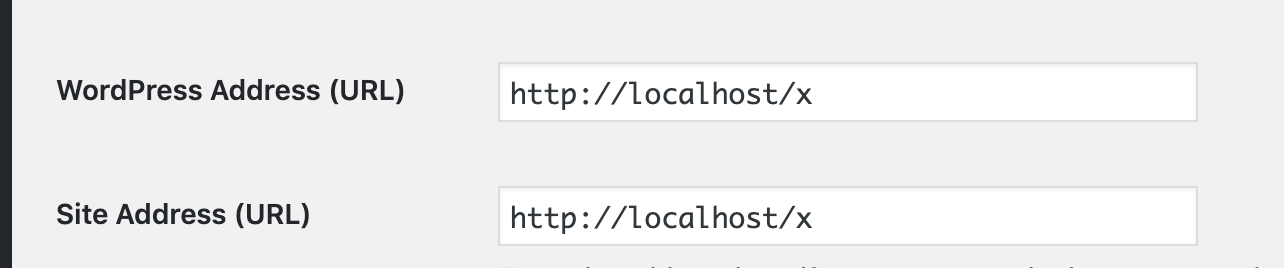
If it still doesn’t work, please create a separated ticket and provide us with login credentials(by clicking on the Secure Note button at the bottom) so we can take a closer look? To do this, you can make a post with the following info:

  • Link login to your site
  • WordPress Admin username / password

Thanks.
I found the offending plugin. Turned out to be the hide wp-login one.

Thanks for support and suggestions

Glad to hear you got it sorted, Matthew.

This topic was automatically closed 10 days after the last reply. New replies are no longer allowed.