My declared link in the href field is not working anymore:
404 website is missing.
Thanks in advance
My declared link in the href field is not working anymore:
404 website is missing.
Thanks in advance
Hi Rolf,
Thank you for writing in, did you just remove/install an SSL certificate recently? If so, please navigate to Settings > Permalinks and re-save it to re-index your pages.
If that did not work, please follow the solution provided here.
Let us know how it goes,
Cheers!
Hi,
I followed your instructions, but unfortunately it doesn’t work.
The following errors occurred:
Failed to load resource: the server responded with a status of 404 ()
https://www.xxx.de/wp-content/plugins/cornerstone/assets/dist/js/site/cs-head.js.map
https://www.xxx.de/wp-content/plugins/cornerstone/assets/dist/js/site/cs-body.js.map
https://www.xxx.de/wp-content/themes/x/framework/dist/js/site/x.js.map
Thank you, Rolf
There is also another error:
The source list for Content Security Policy directive ‘script-src’ contains an invalid source: ‘‘strict-dynamic’’. It will be ignored.
Best regards Rolf
Hey Rolf,
Make sure your both Site Address URL and WordPress Address URL in Admin > Settings > General are the same and then go to Settings > Permalinks under Common Settings choose Post Name and save the settings:
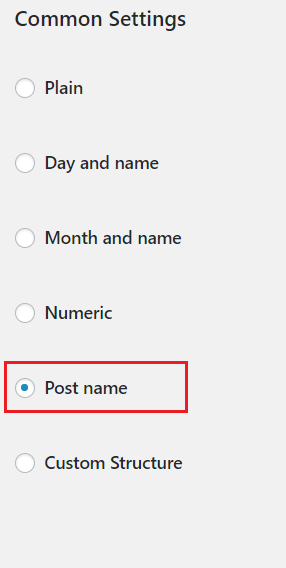
Let us know how this goes!
No, unfortunately not…
I just deleted my cache again. Now it’s working…
Thank you very much !!
Glad you’ve sorted it out and thank you for letting us know.
Cheers!
This topic was automatically closed 10 days after the last reply. New replies are no longer allowed.