Background Image in Section

This new version is confusing me. For the holidays, I changed some things on our front page, but I need to change it back

So I created a new section and I used to be able to select a background image to go across the whole site. Right now, I only see the background color available. How do I put in the image to be in the background of the whole section?

Thanks!
Hey There,

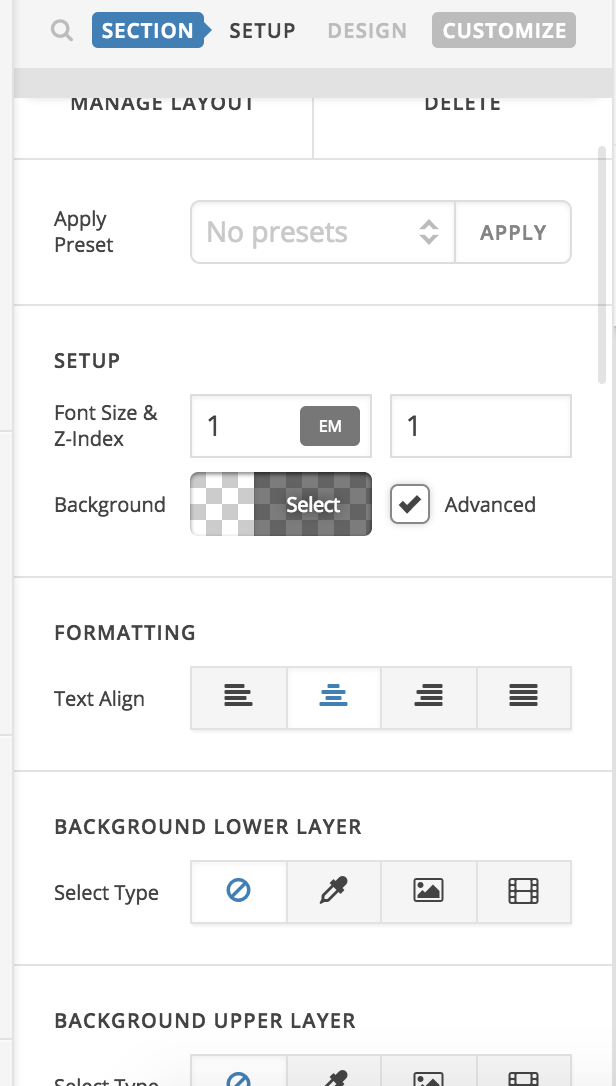
To add the background image to a section, you need to check on the advanced button:

Regards!

Once I click Advanced, I changed Image in both Upper and Lower Layer feature, but nothing is showing up. Please advise…??..

Hello There,

Could you please provide the url of the page in questioned so that we can take a closer look?

Thank you in advance.

I canceled development of the page. Is there a way to fix this?

Hello There,

With no url, we can only guess to resolve via hit and miss solution. Please edit your page back in Cornerstone. Make sure that your section has a row and a column even it is is empty. Please set a minimum height of the column so that the background image you added in the section will be visible. Please keep in mind that the height of the background image is dependent with the height of the section which is again dependent of the height of the columns inside it.

Hope this helps.

This topic was automatically closed 10 days after the last reply. New replies are no longer allowed.